Inside toolbench: the runtime for small interactive web tools
Sharing one interface across every tool also means sharing its failure handling.
On this page · 7 sections
- From a page load to a form
- What the runner guards against
- A worker is there to be stopped
- The worker protocol, and a bundling trap
- How a graph is laid out and routed
- Known answers are part of the tool
- Size budgets
- The contract only grows
- Why every migration is the identity function
- Limits, and what comes next
A pattern with catastrophic backtracking, where a regular expression engine tries an exploding number of ways to match, took 0.6 seconds at 37 characters and 4.2 seconds at 41 in V8. The regex explainer among toolbench’s examples froze the page on it, and a reader typing one character at a time walks straight up that curve. Chromium and Firefox both ground through it, while WebKit returned almost at once, because JavaScriptCore abandons a runaway backtrack. Two engines in three would hang, so the one that happens to rescue the page can’t count as a bound. On the main thread nothing can interrupt the engine while it is inside a match.
That is the kind of problem this post is about. The first part introduced toolbench: a tool is a pure function and a JSON manifest, and the runtime builds the form, runs the function and draws what it returns. Because tools only return data, I chose to handle the failures around them once, in the framework: a run that never ends, a slow answer arriving after a newer one, a graph that has to come out the same everywhere, and an upgrade that quietly changes an old tool’s answer.
The short version
- The runner does what a plain function call can’t. Every run is numbered so a stale answer is dropped, and a worker tool’s run can be stopped at a deadline.
- A worker is there to be terminated. It is not a sandbox.
- A graph is laid out with a search budget counted in steps rather than milliseconds, and arithmetic chosen to round the same in every engine, so every browser computes the same layout.
- Known answers live beside the code and are compared exactly, so an upgrade that changes an old tool’s answer fails a test instead of reaching a reader.
From a page load to a form
A tool sits on a page in one of three modes: a card, the compact form; page, everything; or embed, the page form without its title, for an article. When toolbench starts on a page it has every manifest, as data, and none of the tools’ code. On mainLog that start is itself deferred until a tool comes near, which is why a page with no tool loads nothing. Every manifest was checked when the site was built, so the registry only indexes them and refuses two tools with the same id. Each <tool-host> then reads any seed written into the page, finds its manifest and paints its facade, the cheap stand-in a tool shows before it opens. A card waits for a click. A page or an embed watches for coming near the viewport, with an IntersectionObserver and a generous margin.
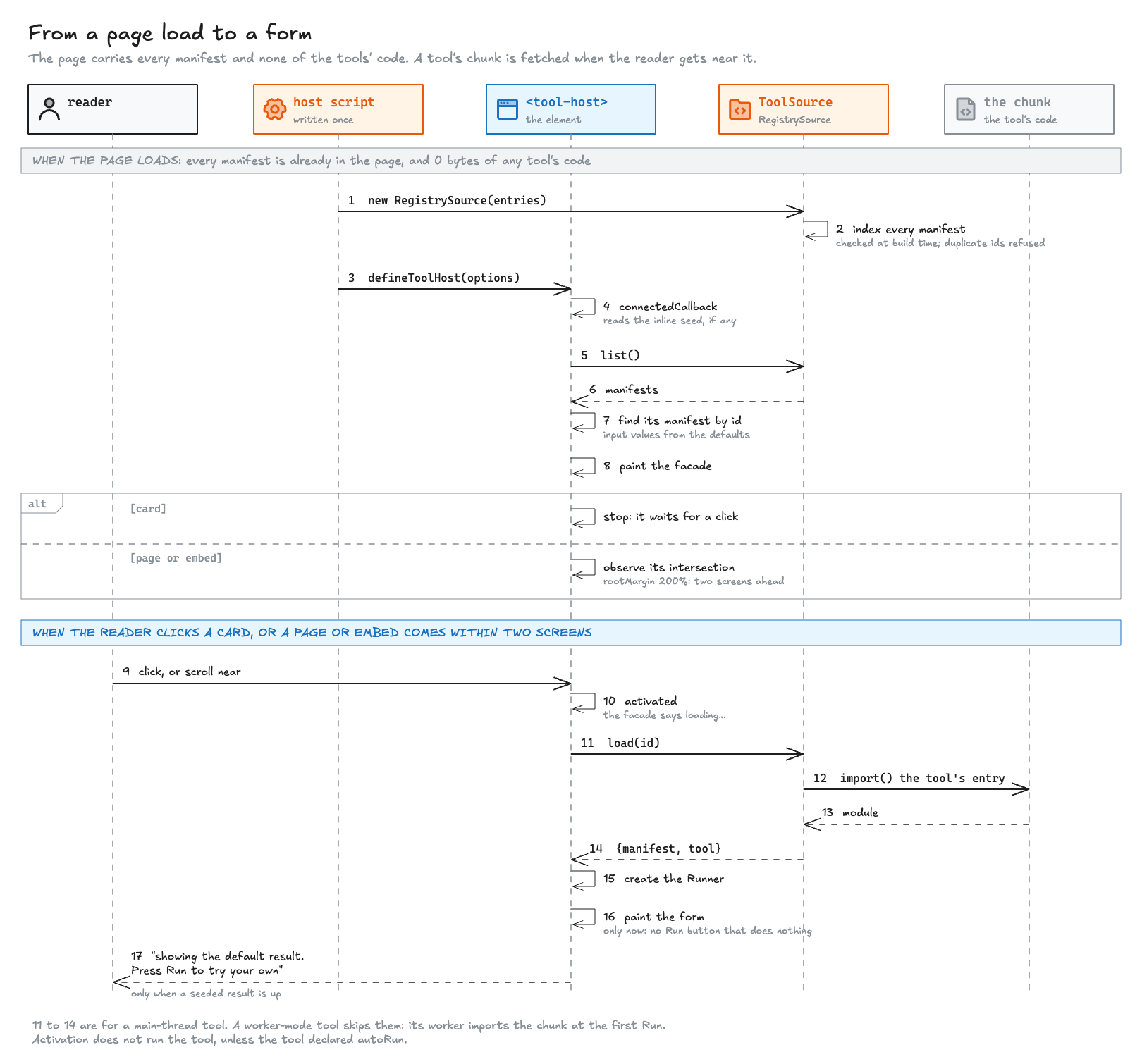
A seed, mentioned there, is a tool’s answer for its default inputs, computed during the site’s build and written into the page as data so a closed card can show it. On activation, a tool on the main thread imports its chunk, creates its runner and only then paints the form, so there is never a Run button with nothing behind it. A worker tool skips the import. It paints its form at once, and its worker fetches the code at the first Run.
I measured what the browser fetched on mainLog for these posts, in Chrome, gzipped. The worker tool was the Capacity planner, opened on a page where the runtime had already loaded:
| Step | Fetched |
|---|---|
| A page with no tool | Nothing of toolbench |
| A long post, before its tool is near | Nothing of toolbench |
| Scrolling near that tool | Runtime 32.1 KB, this page’s two manifests 3.2 KB, chart 9.6 KB |
| Opening a worker tool | Nothing new |
| Its first Run | Worker 1.6 KB, tool 2.2 KB |
A tool’s own code is a few kilobytes, and it comes only on demand. The shared part is the real cost, and it is paid once per page however many tools the page holds. On mainLog it was once much larger than on the framework’s own bench: the registry loaded the manifest of every tool eagerly, long ones with descriptions, samples and links, and the same manifests rode along in the worker, which imported the registry module for its loaders. That came to 73.2 KB for the runtime and 46.1 KB for the worker. Now each manifest is its own chunk, fetched only for the tools a page renders, and the worker imports a module that holds the loaders alone, which is where the numbers above come from. Toolbench 0.15.0 took the runtime from 35.6 to 32.1 KB on this page, because the site’s build now checks every manifest and the checker, a 6.7 KB chunk of its own, is never sent.
What the runner guards against
The runner is the part of the runtime that calls a tool. It tracks which run is current, passes the tool its context, ctx, which carries a cancellation signal and a progress callback, and enforces a worker tool’s deadline. A plain function call does none of that, and each concern has one mechanism:
| Concern | Mechanism |
|---|---|
| A newer run must win | Every run gets a sequence number. A superseded run’s signal is aborted and its result dropped, though a worker still busy in a synchronous loop finishes it first, or hits its deadline |
| Progress must not swamp the page | Progress updates are batched to one animation frame |
| A late progress frame must not overwrite the result | Whether the run is still current is checked when the frame is drawn, not when the update was reported |
| A runaway tool must be stoppable | A timer and worker.terminate(), then the worker is discarded |
| A worker that fails to start must not hang the page | An error listener on the worker fails the run |
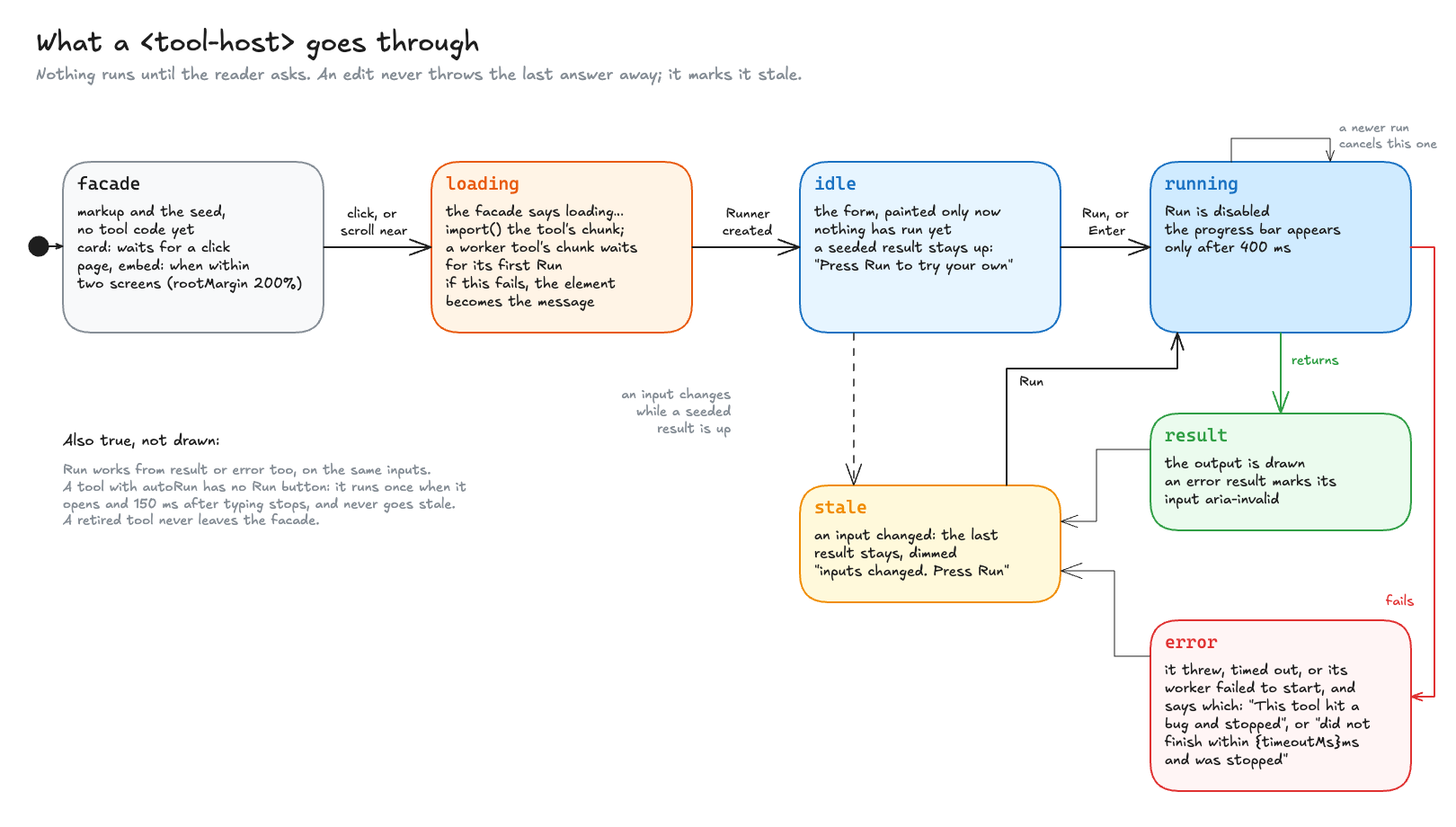
<tool-host> goes through. Nothing runs before Run, a newer run cancels the one in flight, and an edit marks the last answer stale rather than throwing it away.A worker is there to be stopped
A Web Worker is a separate JavaScript thread with no DOM, which talks to the page by messages and can be terminated from outside. That last property is why toolbench uses one. Keeping the page responsive comes with it. A tool asks for a worker with "thread": "worker" in its manifest, and can set timeoutMs, which defaults to five seconds. The timer starts when the run is posted, so on a first run it also covers the worker importing the tool’s code, which on a slow connection is part of what the reader waits for.
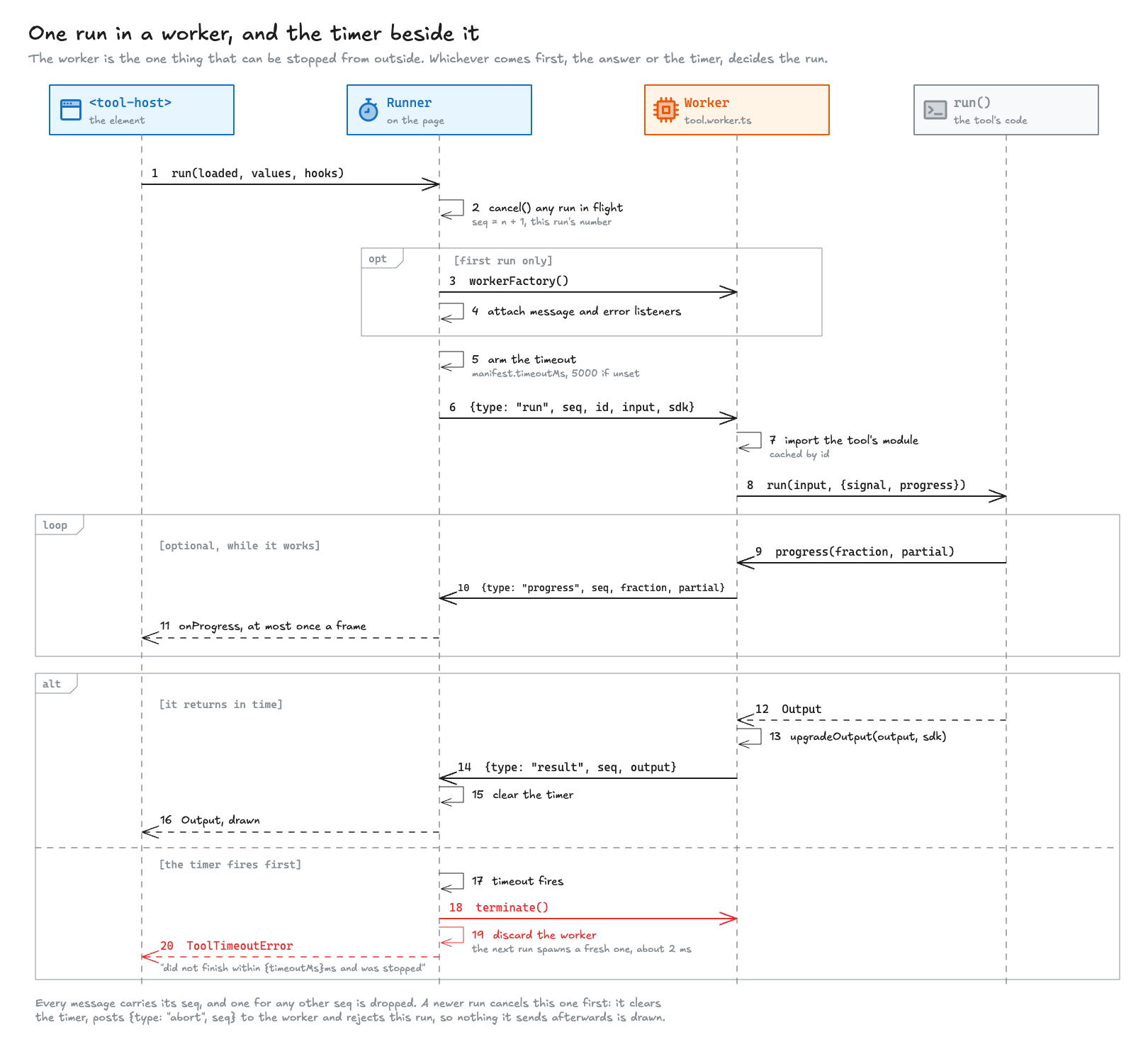
A timeout on the main thread can’t promise anything. A function that holds the main thread also holds the timer that would interrupt it. The runner does pass a cancellation signal, ctx.signal, but an abort can only reach a tool that yields to the event loop between pieces of work, with a timer or a message, so that the abort has a chance to be delivered. A tight synchronous loop never yields, on either thread. Terminating the worker is the one stop that works on code that never checks anything, which is why the deadline is enforced that way rather than by asking.
That is why the regex explainer from the opening now runs in a worker with a two-second limit. It also lost autoRun, the opt-in that runs a tool as the reader types, because the validator refuses it on a worker tool: worker tools are the ones that can be slow.
The Capacity planner on mainLog runs in a worker with a 15-second limit, because its simulation mode grows with the number of trials. This is the tool itself:
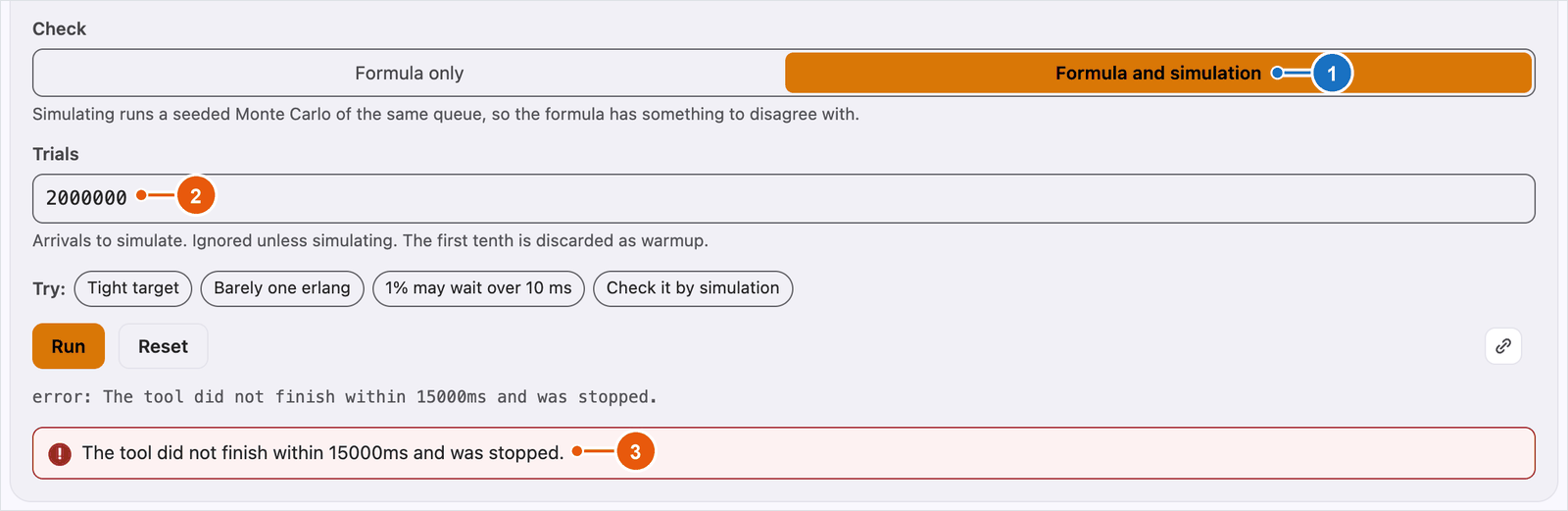
Press Run, and the worker starts and fetches the tool’s code. Then press the “Check it by simulation” sample and Run again: the answer now comes from simulating the queue, which takes longer and may show the progress bar. With the check set to simulation, two million trials and an arrival rate of 1,000,000 per second, the run can outlast its limit, which is what the screenshot below caught:
A worker is not a sandboxWorker mode protects the page’s responsiveness, not its security. A worker shares the page’s origin and cookies, can still call
fetch, and, loaded from its own URL, takes its Content-Security-Policy from its own response rather than the page’s. A tool runs with the privileges of the page that embeds it, so embedding one means trusting its code.
The worker protocol, and a bundling trap
The messages between the page and the worker are about forty lines, written by hand. An RPC library such as Comlink, which makes a call into another thread look like a function call, was the obvious alternative. Most of what the protocol does would have needed handling on both sides anyway. An AbortSignal can’t be cloned into a worker, and ctx.progress is a function, so the worker builds ctx on its own side from messages, and the timeout is a terminate() that no proxy is involved in. What was left after that was small enough that a dependency would have saved very little.
Every run carries a sequence number, and a message for any other sequence is dropped, so a slow run that was superseded can never overwrite a newer answer. Progress updates are batched to the next animation frame, and whether the run is still current is checked when the frame flushes rather than when the update was reported, because a partial result drawn one frame after the final one would replace it.
When the timer fires, the runner terminates the worker and fails the run with a timeout error. It keeps nothing from that worker, not even the modules it had loaded, and starts a fresh one on the next run. Starting a fresh worker is cheap, and starting clean means there is never a question of what state a half-finished tool left behind.
The host has one bundler setting to get right. Vite builds a worker as an iife by default, a single self-contained script that can’t be split into chunks. A worker that imports each tool lazily needs ES module output, so a host sets worker: { format: "es" }, or the build stops with Invalid value "iife" for option "worker.format" - UMD and IIFE output formats are not supported for code-splitting builds. Vite also builds a worker in a separate pass that shares no chunks with the page, so every tool the worker can reach is emitted twice. A tool declares one thread, so a reader downloads one copy, and the duplicate costs only deploy bytes.
How a graph is laid out and routed
The graph kind came from the State machine analyzer on mainLog, which draws a machine of states and events as a picture. The first part has it running. I wanted orthogonal edges that leave a node from the middle of a side, as few crossings as possible, and the same picture in every browser, so that a screenshot in a post or a bug report shows what every reader sees.
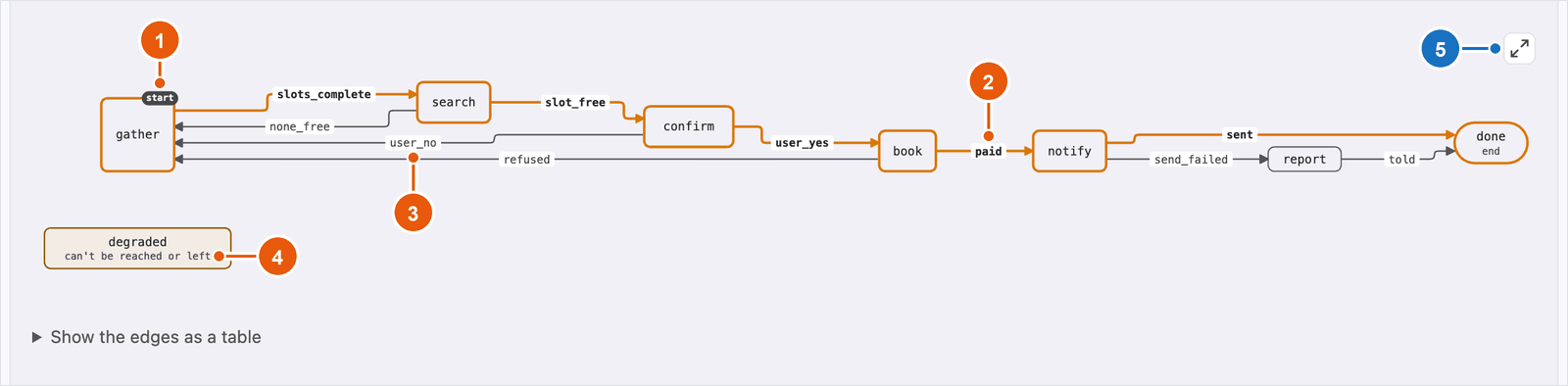
The layout is layered, the approach Sugiyama, Tagawa and Toda described in 1981, which Graphviz’s dot and ELK’s layered algorithm also follow. It runs in five steps:
- Cycles are broken by a depth-first search in input order, and self-loops are set aside.
- Each node gets a rank, its layer along the graph’s direction, by longest path. A tool can pin a node’s rank, and every rank is doubled so edge labels get layers of their own.
- A long edge is split by dummy nodes, one per layer it crosses, and a label is a dummy too, so room for it is reserved like room for a node.
- Each layer is ordered by barycentre and median sweeps, which move a node toward the average position of its neighbours, with a pass of adjacent swaps after each sweep. The order with the fewest crossings is kept.
- Positions come from weighted means: each node would like to sit at the average position of its neighbours, and isotonic regression finds the closest positions that keep the layer’s order and the gaps between nodes. One-to-one chains are straightened, and each gap is made as wide as the routes through it need.
Ports, the points where edges attach, are decided before any routing. An edge leaves from the side facing its other end. One edge on a side attaches at the side’s midpoint. Several are packed symmetrically out from the centre, 16 pixels apart, in the order of where their other ends are, so they don’t cross at the node; this is the CENTER and DISTRIBUTED port placement of ELK. An edge moves to another side only when its facing side is full, and never attaches at a corner.
Each edge is then a path on an 8-pixel grid between its two ports, found by A* search with the penalty model of libavoid: 1,000 for a crossing, 35 for a bend, 60 for a segment running backwards, and 4,000 for a stretch shared with another edge, which is allowed only when no other route exists. The grid is what makes overlap a rule rather than a hope. A grid edge has one owner, a point where a route turns belongs to that route, and a point a route passes straight through can be crossed once, at a right angle. A shared stretch is forbidden unless no other route exists, and then it costs 4,000.
I had used those exact penalties before, in the diagram tooling I built for an agent that draws architecture diagrams. That tooling runs libavoid itself, a C++ library compiled to WebAssembly, offline in Node, and its port rules are where toolbench’s corner inset comes from. libavoid’s WebAssembly build is about 175 KB gzipped, against 18.5 KB for toolbench’s whole base graph chunk, layout included, so toolbench has its own small A* router in TypeScript and keeps the weights that had already worked. The cost is a router I maintain myself, with its own tests, instead of a library someone else has spent years on.
A graph the first pass leaves dense with crossings, up to 60 nodes, fetches one more chunk, a crossing search. It scores a drawing with the same weights, measured on the drawn routes, and tries three kinds of move: every order of a layer of two to four nodes, a swap of neighbours beside an edge that still crosses, and ripping up an edge that still crosses and routing it again against all the others. Each move is placed and routed for real, and kept only if the score drops.
Two decisions keep the picture identical in every browser. The search budget is counted in A* states rather than milliseconds, four times what the first routing cost and at most 600,000, so a slow machine takes longer to draw the same picture instead of giving up earlier and drawing a different one. And the layout avoids Math.sin, Math.cos, Math.atan2, Math.hypot and **, which JavaScript engines are not required to round correctly and which can differ in the last bit, using only +, -, *, / and Math.sqrt. The first four are correctly rounded under IEEE 754, so every engine gets the same bits. The specification leaves even Math.sqrt approximate, but engines compute it with the processor’s square root, which IEEE 754 does round correctly, so the guarantee rests on that practice and on the browser tests in three engines rather than on the specification alone. Text width is a monospace estimate for the same reason, so the geometry doesn’t depend on which fonts are installed.
Layout runs on the main thread for an ordinary graph. Past a hundred nodes it moves off it, because a layout of 120 to 500 nodes measured 0.1 to 13 seconds: the edge table appears at once with a line saying the picture is being laid out, the layout runs in the host’s worker when there is one, and the picture replaces the line when it arrives. Optional parts such as trees, force layouts and groups are separate chunks, fetched only by a graph that uses them.
Known answers are part of the tool
Every tool ships a cases.json beside its code: inputs paired with the exact results they must produce. Because a tool is a pure function that returns data, a known answer is an ordinary equality check, with no browser and no screenshot involved. This is one of the hello world’s:
{ "name": "an empty name is an error on the name field, not an empty greeting", "input": { "name": " " }, "expect": { "kind": "error", "message": "Type a name.", "input": "name" }}Comparison is exact by default. A tool that starts emitting a field twice, reorders its fields, or returns something plausible beside a correct error fails its case.
A known answer is most useful when it was not produced by the code it checks. The RTP/RTCP inspector on mainLog decodes the packets a voice or video call sends, and its cases were built by hand from the layouts in the RFCs, so each expected answer was known before the decoder existed. This one is a NACK, the feedback message a receiver sends to ask for lost packets again, as defined in RFC 4585:
{ "name": "a NACK: PID 100 with BLP 0b101 asks again for 100, 101 and 103 (RFC 4585 6.2.1)", "input": { "packet": "81cd0003 7a3b9c5d 1f2e3d4c 00640005", "view": "fields", "arrival": "" }, "match": "subset", "why": "Built by hand from the layout in the spec the name cites, so the decode is checked against what was encoded. Subset because the result is a group; the field count pins the part.", "fieldCount": 2, "expect": { "kind": "fields", "role": "answer", "id": "answer", "fields": [ { "label": "Packet", "value": "RTCP, 16 bytes: NACK" }, { "label": "Asks again for", "value": "3 packets: 100, 101 and 103", "note": "On stream 0x1F2E3D4C. Resend them if they are still in the send buffer; otherwise the receiver conceals the gap." } ] }}The packet 81cd0003 7a3b9c5d 1f2e3d4c 00640005 asks again for packet 100 and, through the bitmask 0b101, for 101 and 103, so the case checks the decoder against the specification rather than against itself. It also compares only the first part of a longer answer, which a case may do only by writing down why, in why. A fields answer compared that way must also give fieldCount, so a field that silently disappears still fails.
The inspector is on mainLog, so the case can be checked by hand. Its NACK sample is the same packet: press it, then Run.
The test that runs all of it is three lines, the same in the hello world example and in any site’s own CI:
import { describe, it } from "node:test";import { checkToolDirectory } from "@toolbench/sdk/fixtures";
checkToolDirectory(new URL("../tools/", import.meta.url), { describe, it });checkToolDirectory validates every manifest, checks that each directory name is its tool’s id, runs every case and compares the result, and runs every sample, so the first button a reader presses can’t be the first thing to crash. It also fails any case whose kind the manifest didn’t declare, so kinds can’t drift into fiction. It takes describe and it as arguments rather than importing a test runner, which keeps the SDK free of dependencies and lets it run under node:test, Vitest or anything with the same shape.
mainLog runs that harness over every tool, in Node, before anything is built, with a 50 ms limit per case for tools on the main thread, since a slow case there is a slow page for a reader. Toolbench’s own CI does the same for its example tools against the current SDK, and runs a browser suite that drives the built bench, which draws those tools, in Chromium, Firefox and WebKit. The fixture tests catch a change to an expected answer. The browser tests cover the interactions and drawing the bench exercises. mainLog’s own run is the same check for its tools, the next time it upgrades. If I could keep only one part of toolbench, it would be this one: the known answers live beside the code, they are exact, and something actually runs them.
Size budgets
These are gzipped sizes from the framework’s own bench, a plain Vite page with no UI framework, at commit 9a7dcc1:
| What | Gzipped | Downloaded by |
|---|---|---|
| Runtime and the bench’s page wiring | 28.5 KB | Every page that uses a tool, once |
| Worker entry | 4.9 KB | Pages with a worker tool, at the first Run |
| Chart renderer | 8.9 KB | Pages whose tool draws a chart |
| Graph, base chunk | 18.5 KB | Pages that draw a graph |
| Graph, crossing search | 1.6 KB | A dense layered graph |
The utf8-bytes, percentiles and regex-explainer examples | 0.6, 1.3 and 2.8 KB | Only when that tool opens |
Every chunk has a budget in scripts/size-check.mjs, and CI fails a build that goes over one. A budget is raised only in the commit that spends it, with the reason written beside the number, and it comes down when something is saved.
Budgets measure chunks, not behaviour, so a browser test also checks what a closed card actually downloaded against an allowlist. That test exists because a closed card on mainLog was once fetching the chart renderer, triggered by its manifest declaring a chart rather than by anything being about to draw one. A denylist would only have caught that chunk once someone knew to list it.
The contract only grows
Three version numbers are easy to confuse. The packages have a version, 0.15.0 at the time of writing, which changes with every release. A tool has its own version, which is for humans and which nothing branches on. And a manifest has sdk, the contract version, which is the only compatibility boundary. It is at 9 now, and the hello world from the first part still declares 1, because a tool declares the version of the newest feature it uses rather than the newest there is.
I made the contract additive. A new version may add a result kind, an input type or an optional field. It may not remove, rename or narrow anything, or give an existing field a new meaning. That rule binds the framework more than it binds tool authors: once a result kind means something, it means it for good, even when a different meaning would be more convenient later. In return, a tool written against version 1 loads unchanged in a runtime that speaks version 9.
Why every migration is the identity function
Every manifest is walked up a chain of migrations before it is validated, and every result is walked up the same chain before a renderer sees it. Each step has two halves, one for the manifest and one for the output.
For an additive change, both halves are the identity function, which returns its input unchanged. The chain exists so that everything downstream of it, the validator and the renderers, only ever deals with the current version: an old manifest is stamped current on the way in, and an old result on the way out. Every step so far has been an identity in both halves, so it costs nothing, and the day a change needs a real conversion it has one place to live, though the policy says that day should not come. That is a policy, not a proof: a validator could start refusing an old manifest, or a renderer could change what a kind means, with every migration still an identity. The evidence is the tests. Toolbench’s CI runs its example tools’ known answers on every change, its contributing rules require each existing fixture to pass without being edited, and a site like mainLog runs its own tools’ answers when it upgrades.
The chain also checks the other direction. Validation refuses a manifest that uses a feature newer than its declared sdk, with a message such as inputs[0].lang: is from contract version 6, but the tool declares "sdk": 4. Without that check, a runtime of the declared version would load the tool and quietly drop what it didn’t know, and the reader would lose a feature with nothing saying why.
The versioning guide has the full policy.
Limits, and what comes next
Two things sit outside the contract today: files and the network.
A file could be a declared input like any other, but the contract has no answer yet for how one is represented, how large it may be, how a known answer stores one, or what a card’s default and seed would be. Nothing stops a tool from calling fetch today, because there is no sandbox, and a tool can even pass ctx.signal to it. What is missing is a contract for requests: who owns the timeout and the failure message, and how a known answer can be checked when the answer comes from a server. Both are planned as additive contract versions.
There is also no sandbox, as the caution above says, so a tool is code you trust. And the accessibility of the form and the results has been checked by tests of the wiring, labels, descriptions and focus, but not yet with real screen readers. That pass is the next piece of work I consider necessary rather than nice to have.
The input types were the most visible gap, and 0.15.0 filled it: radio buttons, as a select drawn in segments, date, time and colour inputs, a password field, multi-select and repeatable rows have shipped. The direction I want is interactive charts and diagram tools, including animation over diagrams, without giving up what it is now: a function and a manifest, a few kilobytes per tool, and known answers that run on every build.
If you take toolbench apart further than this and find a corner I got wrong, I’d like to hear about it, in the comments below or in an issue on GitHub. And if you build something with it, tell me what it was.
Related posts

How many concepts is too many
Framework debates trade concept counts that measure different things. Count what the smallest real program makes its user write, in separate columns and per reader, find the rules the count can't see by misspelling them, and keep an extra concept only when it moves a check earlier or gives users a seam they can see.
The unwritten rulespythonapi-designframeworks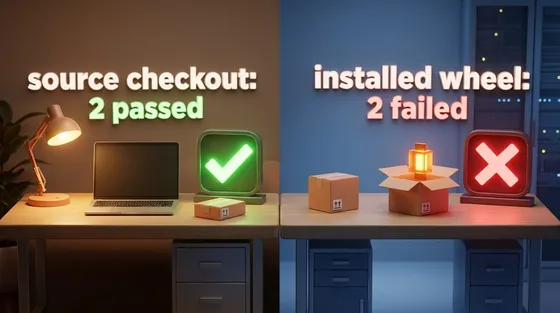
Green on my laptop, red in CI
A pytest plugin passed every test from the source checkout and failed twice in CI, because only the installed wheel told pytest the plugin existed.
The unwritten rulespythontesting
Keeping optional Python imports optional
A test that checks importing a library leaves its optional dependency unloaded, and proves it got far enough to notice.
The unwritten rulespythontesting
 Software craft
How many concepts is too many
Framework debates trade concept counts that measure different things. Count what the smallest real program makes its user write, in separate columns and per reader, find the rules the count can't see by misspelling them, and keep an extra concept only when it moves a check earlier or gives users a seam they can see.
pythonapi-designOct 2026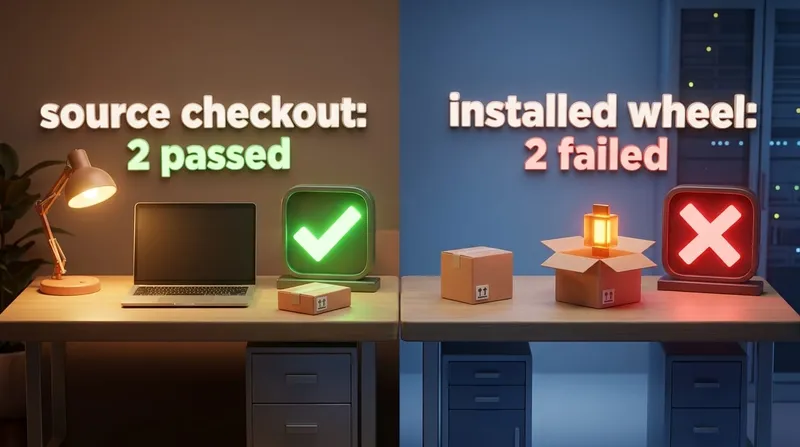 Software craft
Green on my laptop, red in CI
A pytest plugin passed every test from the source checkout and failed twice in CI, because only the installed wheel told pytest the plugin existed.
pythontestingSep 2026 Software craft
Keeping optional Python imports optional
A test that checks importing a library leaves its optional dependency unloaded, and proves it got far enough to notice.
pythontestingAug 2026
Comments