Circuit breakers for inference
What HTTP 200 misses, and the timeouts, retries and budgets for model calls that catch it.
I set the Anthropic Python SDK’s timeout to three seconds. The response took eighteen seconds and completed normally.
The test server was sending one token every 1.5 seconds, twelve tokens altogether. Each arrived before the read timeout expired, so the SDK kept waiting for the next one. A setting that looks like a limit on a model call was actually a limit on each gap in the response.
That distinction matters when a person is waiting for an agent. The response can be too slow to be useful, consume the task’s budget, and still count as a successful request. A circuit breaker watching for errors has nothing to record.
On a multi-agent platform I worked on, inbound messages had a budget of less than two seconds across several model calls. Retries, timeouts, circuit breakers and bulkheads (separate capacity, so one slow dependency can’t starve the rest) were part of keeping it there. Model calls need that machinery too, but deciding what counts as a failure takes more work. Time, the validity of an answer and progress across turns don’t all show up in the same place.
The short version
- A read timeout doesn’t bound the whole call. In the SDK experiment,
timeout=3.0allowed an eighteen-second stream to finish. An outer five-second deadline stopped it. - The defaults multiply. A 600-second wait with two retries is about thirty minutes per call. A loop that continues after each failed call can spend five hours on ten turns.
- The expensive failures can return 200. Slow streams, malformed tool calls and repeated actions need checks beyond HTTP status.
- Put the limits where their signals are visible. Bound time inside the call, validate its answer, check progress across turns, and give the conversation a total budget and a handover path.
- Stopping sooner has a cost. In a simulation with invented failure rates, all five checks answered 867 conversations rather than 899. Waits over two minutes fell from 249 to zero, and silent failures from 101 to zero. The remaining 133 conversations were handed to a person.
The timeout that isn’t a deadline
The Anthropic and OpenAI Python SDK versions used here both default to a 600-second read timeout. To find out what that timeout would actually stop, I ran Anthropic SDK 1.13.0 against a small local server with timeout=3.0:
1. stream, a token every 1.5s, timeout=3.0s: completed in 18.0s, no timeout (12 tokens)2. not streamed, 20 bytes every 1.5s, timeout=3.0s: completed in 16.5s, no timeout3. stream, a 4s stall after 3 tokens, timeout=3.0s: httpx2.ReadTimeout after 7.5s; an anthropic.APIError? False; an anthropic.APITimeoutError? False4. stream, a token every 1.5s, timeout=3.0s: deadline 5s: stopped after 5.0s with 3 of 12 tokens5. no response at all, timeout=3.0s: anthropic.APITimeoutError after 10.3s, 3 attempts (2 retries)These are wall-clock measurements. The SDK is real; the server deliberately controls when each chunk arrives.
The second run is easy to overlook. Turning streaming off doesn’t fix the problem: a response body can arrive slowly too. The HTTP client sees a sequence of reads either way.
Both pinned SDKs use httpx2, a successor to httpx by the same author, with the same timeout model. The httpx documentation puts it in one sentence: “The read timeout specifies the maximum duration to wait for a chunk of data to be received”. Whenever a chunk arrives in time, reading the next one gets another wait. There’s no total duration in that rule.
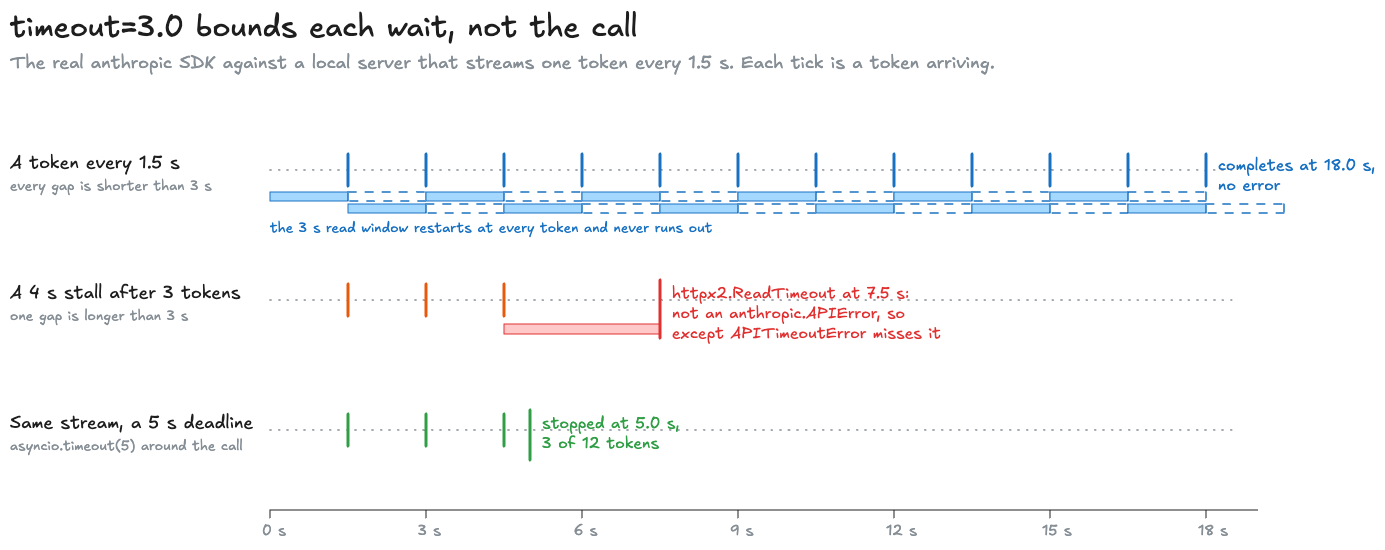
Run three has a separate trap. The timeout fires after the response headers have arrived, while the SDK is consuming the stream. The exception is httpx2.ReadTimeout, not anthropic.APITimeoutError, and not any other anthropic.APIError. A handler catching the SDK’s timeout exception misses it. The SDK doesn’t retry that interrupted stream either.
With the silent server, the failure happens earlier. The SDK makes three attempts of three seconds each, waits between them, then raises its own APITimeoutError. Those two paths deserve separate tests even if the application reports both as “the model timed out.” Claude’s errors documentation makes the broader point too: “When receiving a streaming response over server-sent events (SSE), an error can occur after the API returns a 200 response.”
An elapsed-time deadline stops the trickling response:
async with asyncio.timeout(deadline): async with client.messages.stream(**ASK) as s: async for _ in s.text_stream: got += 1That’s run four, with a deadline of five seconds: cancellation at 5.0 seconds, with three tokens received. It doesn’t need a long gap between tokens to fire.
The placement of that wrapper matters. Here it encloses the streaming operation, including the wait to start receiving it. Any retries performed inside that operation also consume the five seconds. A fresh deadline around each attempt would allow a longer total. A limit around the task has a different scope again.
The pinned OpenAI Agents SDK exposes this idea as ModelSettings.timeout, described in its source as bounding “the complete model attempt”. The default is None. The read timeout and the attempt deadline are separate settings.
The demo's slow server, and why its numbers move
fake_server.py speaks just enough of the Messages API for the real SDK to parse its replies: server-sent events for a stream, or a JSON body written twenty bytes at a time. It runs on 127.0.0.1, so the experiment needs no API key or external connection.
The times are wall-clock measurements. One run of the eighteen-second stream finished in 18.1 seconds. The silent-server case also includes random retry backoff, which shortens each wait by up to a quarter. CI checks ranges rather than exact timings.
The budget nobody chose
The defaults are easier to reason about once their scopes are written down. These came from the installed packages:
anthropic 1.13.0: timeout read=600s connect=5s, max_retries=2, backoff 0.5s doubling to 8s, retry-after obeyed up to 4,294,967sopenai 3.28.0: timeout read=600s connect=5s, max_retries=2openai-agents 0.23.1: max_turns=10, ModelSettings().timeout=Nonelanggraph 1.2.14: recursion_limit=10007For a server that accepts the connection and sends nothing, the arithmetic is roughly thirty minutes per SDK call: three ten-minute waits, plus backoff. If the agent loop catches that failure and starts another turn, ten failed turns can take five hours.
That last step is an assumption about the loop. The Anthropic SDK has no turn limit, and the ten-turn default belongs to the OpenAI Agents SDK. An application that exits on the first failed call won’t make another nine. The five-hour case is what a loop that keeps going permits, rather than a claim that every framework runs that way.
A successful trickle needs no retries. At two tokens a second, a 4,096-token response takes about 34 minutes. Ten such calls take 5.7 hours. The read timeout never fires; max_tokens eventually ends each answer.
Then there’s retry-after. The pinned Anthropic SDK accepts a value of up to 4,294,967 seconds, about fifty days. That ceiling comes from a platform limit on sleeping. It says very little about how long an application ought to wait.
None of these individual settings expresses a support chat’s latency budget. To get that budget, someone has to decide how much time the conversation has and how much of it retries are allowed to consume.
LangGraph's docs say 1,000; the installed code says 10,007
LangGraph’s Graph API page says: “Starting in version 1.0.6, the default recursion limit is set to 1000 steps.” In langgraph 1.2.14, _internal/_config.py, line 32 contains:
DEFAULT_RECURSION_LIMIT = int(getenv("LANGGRAPH_DEFAULT_RECURSION_LIMIT", "10007"))The tags show 25 through 1.0.5, 10,000 from 1.0.6, and 10,007 from 1.1.4. The 1.0.6 pull request described a move to 1,000, while its diff used 10,000. The later value makes the default distinguishable from a limit a user deliberately set.
This counts graph steps, which needn’t correspond one-to-one with model calls. It doesn’t bound elapsed time either way, but the discrepancy is a good reason to inspect the version actually running.
Four ways a model call goes wrong
A conventional circuit breaker counts failures on a dependency. Enough failures open the circuit, so calls fail fast or take another route. After a cooling-off period, a half-open state permits a trial request. If it works, the circuit closes. Martin Fowler’s description is a good reference for those mechanics.
The definition of a failure is where inference gets awkward. A 429 means the caller is being rate-limited, and a 529 means the provider is overloaded:
| Failure | What comes back | Cost exposure | Useful signal |
|---|---|---|---|
| Overloaded | 429 or 529 | No generated answer in this attempt | Status code |
| Slow | 200, with tokens arriving a few a second | A completed answer can be billed in full | Elapsed time, time to first token, stream rate |
| Malformed | 200, with a tool call that won’t parse | The answer was generated, even though the application can’t use it | Validation of the answer |
| Looping | 200, with the same valid tool call again | Each repeated call adds usage | Progress across turns |
A status-only breaker can see the first row. The other three may complete without an exception. Even a perfectly reliable HTTP connection can spend minutes carrying answers that don’t help the application.
The support-chat simulation makes this concrete. Each conversation needs four good model calls: interpret the question, look up the order, look up the delivery, and answer. The primary provider has five bad minutes, from second 300 to second 600. These are invented failure rates, not measurements of a provider.
Conversation 350 starts during that incident. The trace records elapsed time from the start of the conversation:
defaults: conversation 350 started at 350 s, ended failed after 203.6 s (turn limit), 60,200 tokens 150.8 s primary slow 151.0 s primary overloaded 157.2 s primary ok 163.0 s primary loop 168.8 s primary loop ... 203.6 s primary loopThe first call takes 150.8 seconds. The next is refused, but its retry works. Then the model repeats its tool call eight times, until the agent reaches its ten-turn limit. Only one request returned an error, while the slow response and the repeated calls all returned 200. In the simulation’s default policy, the conversation ends without an answer or a handover, after three and a half minutes and 60,200 tokens.
Detecting that kind of failure takes information from several layers:
| Layer | Status | Time | Validity | Progress |
|---|---|---|---|---|
| HTTP client | Response code | Each read | ||
| SDK and retries | Errors, retries | Each read, per attempt | ||
| Agent loop | What the call returned | The attempt, given a deadline | The application’s check | Turn to turn |
| Conversation | All outcomes | Total and remaining | Failures across the task | Done, or handed over |
The SDK’s retries are a reasonable place to handle a transient refusal. They don’t know that the third successful tool call was identical to the previous two. The application has to make that judgment and decide what to do with it.
Retries on a metered API
An agent can inherit retries from the HTTP client, SDK, framework and gateway, then add another loop around the whole turn. Those retry counts multiply unless a shared budget stops them.
The AWS Builders’ Library article on timeouts, retries and backoff with jitter puts it bluntly: “Retries are “selfish.” In other words, when a client retries, it spends more of the server’s time to get a higher chance of success.” In its example of five layers retrying three times each, “If each layer retries independently, the load on the database will increase 243x, making it unlikely to ever recover.” Its advice is to “retry at a single point in the stack”, which was useful before anyone put a model in the system and remains useful afterwards.
Google’s SRE chapter on overload gives retries explicit limits: “a per-request retry budget of up to three attempts”, plus a per-client rule that “A request will only be retried as long as this ratio is below 10%.” These are examples of policies that account for repeated work across requests, rather than leaving every request free to retry on its own.
A metered model adds a cost to application-level retries. An answer with an unusable tool call may already be billable. Asking again generates another answer, and sends the prompt and accumulated history again too. A retry can succeed and still make the task substantially more expensive.
Some failures won’t improve with another attempt. Claude’s errors documentation says “A tier spend-cap 429 has no retry-after header and keeps failing until access resumes.” Treating that as ordinary temporary overload only adds waiting.
There’s also the question of what the previous turn already did. If it sent a tool call before failing, replaying the turn can repeat the operation. The operation needs an identity that survives retries; changing an attempt ID is no protection against doing the same thing twice. That distinction is covered in When the user changes their mind mid-task.
What gets billed when you abort a stream?
I couldn’t find a definitive guarantee in the Anthropic, OpenAI, AWS or Google documentation I checked. OpenAI’s streaming reference warns: “If the stream is interrupted or cancelled, you may not receive the final usage chunk which contains the total token usage for the request.” That describes reporting, not billing.
Anthropic’s streaming documentation says the usage counts in message_delta are cumulative, so keeping the latest one received gives the client a partial record. It still doesn’t settle what the provider will charge. The only direct statement I found, a reply on Google’s developer forum, said generated tokens would be charged, but a forum reply isn’t a billing specification.
The simulation assumes tokens generated before an abort are billed. The timeout check below gives both figures for its cost estimate: only completed answers billed, or every attempt billed for the output it streamed. Treat the difference as an uncertainty.
Budgets that trip the breaker
So the breaker needs more inputs than status codes. Here are the five checks the simulation can switch on, each at the layer that can see its signal:
- Status breaker. Five consecutive failures on the primary open it for thirty seconds. Calls go to a smaller fallback model during that time, followed by one trial call to the primary.
- Stream-rate check. Three seconds into a stream, check whether it is delivering at least fifteen tokens a second. If it isn’t, abort it and retry on the fallback.
- Validity check. An answer whose tool call won’t parse counts as a failure, including for the breaker. Two in one conversation trigger a handover.
- Loop guard. Three identical tool calls in a row trigger a handover.
- Conversation budget. Sixty seconds and 40,000 tokens in total. With this policy enabled, any conversation that ends without an answer is handed to a person, with the customer told.
The breaker still has its ordinary three states:
The state transitions stay the same. The additional checks change which outcomes count as failures.
The important implementation detail is the set of outcomes passed to breaker.record:
if on("breaker") and model == "primary": seen = {"overloaded"} | ({"aborted"} if on("stream") else set()) | ({"malformed"} if on("valid") else set()) breaker.record(task.now, outcome in seen)With only the breaker enabled, it sees overload errors. With the stream check enabled, it also sees responses aborted for being too slow. Turn on validity checking and malformed answers join the count. The slow stream and malformed answer can both arrive as HTTP 200; the application now has a reason to record a failure anyway.
The primary-model condition matters as well: this count describes the primary. The fallback has its own behaviour. A conversation’s loop guard and total budget answer a different question, about whether to continue that conversation at all.
These thresholds make the checks easy to compare in the demo. They need tuning for an actual workload. Fifteen tokens a second could be an appropriate floor for one model and a poor choice for another; three repeated calls are only a useful signal when the task doesn’t legitimately require that repetition.
The same arithmetic applies to any agent’s settings, so I turned it into a small tool. Pick your stack, which fills in that SDK’s read timeout, retries and turn limit, then add any attempt deadline, max_tokens, and how long the task may take. It shows the worst case for one task and the setting that brings it within the wait, then, for a silent, trickling and overloaded provider, how long each takes per attempt, per call and per task and what stops it, and a chart of how the worst case grows from one attempt to one call to the whole task. Start with the SDK defaults, then try the 30-second deadline sample: it fixes the trickle and still leaves the task far over two minutes, because the retries and turns multiply it.
Five bad minutes, three policies
All five checks answered fewer conversations than the defaults: 867 against 899. That’s the trade-off worth keeping in view while looking at the improvements in latency and handover.
The simulation starts 1,000 conversations, one a second. On a normal day, the primary’s calls are 1% overloaded, 1% slow, 2% malformed and 2% looping. During seconds 300 to 600, those rates become 40%, 20%, 6% and 2%. The fallback keeps its separate, unchanged failure profile. A seed is the number the simulation’s random choices start from, so the same seed always gives the same run. This is seed 7:
| Policy | Answered | To a person | No answer, nobody told | Over 2 min |
|---|---|---|---|---|
| SDK and framework defaults | 899 | 0 | 101 | 249 |
| Plus the status breaker | 931 | 0 | 69 | 131 |
| All five checks | 867 | 133 | 0 | 0 |
python sim.py. The p99, the time that only the slowest 1% of conversations reached or exceeded: 323.8 s, 193.2 s and 29.6 s. Tokens counted as billed: 18.78 M, 20.24 M and 17.08 M, respectively.
The status breaker opens six times. It answers another 32 conversations and nearly halves the number waiting over two minutes. It also consumes about 8% more tokens: conversations that would have failed are now able to continue. Improved availability can increase the bill.
Its benefit varies across seeds, and seed 7 is its best case. On seeds 1 to 5, the change in completed conversations ranges from six fewer to 33 more, and the reduction in long waits ranges from 16% to 45%. The p99 stays above 310 seconds on those seeds, compared with 193.2 seconds here. A breaker helps with refusals, but it leaves slow successful responses running.
With all five checks, the slowest conversation on seed 7 takes 34.8 seconds. No conversation waits over two minutes or ends silently. The other tested seeds also have no waits over two minutes and no silent failures, though their answer and handover counts differ.
Those limits stop some conversations that would eventually have been answered, minutes later. For a support chat, I’d accept that trade if the handover works. For a batch job, a late answer may be perfectly useful. The right budget depends on what the application is waiting for.
The lab contains every combination of the five checks under three incident types. Pick an incident, then switch checks on one at a time. The tall grey bars show the slowest conversation starting in each twenty-second interval; the red bars underneath show conversations that failed without a handover. The tall bars outside the incident come from the normal day’s 1% of slow responses: at two tokens a second, one slow answer takes about 150 seconds before the conversation’s other calls are counted.
This lab runs a real call in your browser, so it needs JavaScript.
Three configurations are worth trying on purpose:
- Only the conversation budget. Every failed conversation is handed over, but 248 still take more than two minutes. The sixty-second budget is checked between calls, so it can’t stop a 150-second response that’s already running. For a hard elapsed-time limit, cancellation needs to reach the call in progress.
- Only the stream-rate check. Long waits disappear, but silent failures rise to 187. Aborting slow calls uses up retry attempts sooner. Without the handover policy, exhausting those attempts just ends the conversation. Stopping wasted work doesn’t, by itself, produce a useful outcome for the customer.
- “Mostly slow,” with only the status breaker. On this run the breaker never opens, and every result is identical to the defaults. It has no signal for the condition causing most of the waiting. Switch on the stream-rate check and aborted responses start contributing to its failure count.
The other seeds, and every rate in the simulation
python3 sim.py --seeds prints every row. On seeds 1 to 5, the defaults answered 886 to 901 conversations, left 99 to 114 silent failures and produced 240 to 253 waits over two minutes.
The status breaker answered 893 to 925, with 131 to 212 long waits and a p99 of 310.6 to 319.0 seconds. All five checks answered 880 to 890, with no silent failures, no waits over two minutes and a p99 of 29.0 to 30.7 seconds.
All failure rates below are invented:
| Model and condition | Overloaded | Slow | Malformed | Looping |
|---|---|---|---|---|
| Primary, normal | 1% | 1% | 2% | 2% |
| Overloaded and slow | 40% | 20% | 6% | 2% |
| Mostly overloaded | 60% | 5% | 4% | 2% |
| Mostly slow | 10% | 40% | 6% | 2% |
| Fallback | 1% | 1% | 8% | 4% |
Once a model repeats a call, it repeats the next one with 90% probability. A normal answer is 300 tokens at sixty tokens a second from the primary or ninety from the fallback, after 0.8 seconds to the first token. Slow responses arrive at two tokens a second.
Input starts at 2,000 tokens and grows by 600 for every prior turn and every prior good answer. That growing input is part of why a loop is costly: later calls keep sending a larger history.
Falling back, and the case against it
The fallback lets the breaker do more than fail fast. It’s also a different model, with different failure modes. In the simulation it keeps its normal failure rates during the primary’s incident, but is worse at valid tool calls and more likely to loop.
A real fallback may change answer quality, wording, price and latency. Its capacity may also be needed by other systems at exactly the same time. The simulation’s results depend on its independent failure profile; they don’t establish that another model will stay healthy during a real incident.
The AWS Builders’ Library article on avoiding fallback argues that “Distributed fallback strategies often make the outage worse.” A path that runs only when something else is broken is often the least exercised part of the system, and the article prefers “code paths that are exercised in production continuously rather than rarely.”
For a model fallback, that’s a reason to send it some normal traffic and evaluate the results before relying on it. Apply the same validity and progress checks to its answers. Moving calls away from a sick provider is useful only if the replacement can still do the work.
What the customer sees
The defaults leave 101 conversations with no answer and nobody told. With all five checks, 133 conversations are handed to a person and none end silently. That change depends on the handover being an explicit part of the policy, not just on the breaker opening.
There still has to be someone available to take the work. The simulation doesn’t model staffing or queue times, and “handed over” isn’t the same as “resolved.” For a support product, those are part of deciding whether this trade is acceptable.
The software also needs to preserve enough state for the handover to mean something: which order was found, which operations completed, what the agent attempted next and why it stopped. Otherwise the person picking it up starts from scratch, and the customer may have to explain everything again.
The degraded state in What a state machine buys an agent gives that handover somewhere to land. Its customer message is written from known state, rather than improvised by the model that just failed. The checks here decide when to enter that state.
A status breaker remains useful. What’s missing is a limit on the successful-looking work around it: the call that keeps streaming, the answer that can’t be used, the next turn that repeats the last one. Deadlines, validation and progress checks make those failures visible. A conversation budget decides how much more work to allow, and a defined end state tells the application what happens next.
Run it yourself
The scripts are in mainlog-code/agent-cost-control. timeouts.py runs the SDK against fake_server.py, defaults.py reads the limits from the pinned packages, and sim.py runs the support conversations.
cd mainlog-code/agent-cost-control
python3 sim.py              # no install neededpython3 sim.py --task 350   # one conversation, each policypython3 sim.py --seeds      # compare seeds
python3 -m venv .venv.venv/bin/pip install -r requirements.txt.venv/bin/python timeouts.py.venv/bin/python defaults.py
The timeout experiment takes about fifty seconds and calls only the local server. CI checks the timing ranges, the defaults in the pinned versions, and the simulation results and lab data. A package update that changes an assumption should fail a check.
For an existing agent, the slow-stream test is where I’d start. It’s small enough to run locally, and it answers a concrete question: when the model keeps sending data, does the deadline actually stop the call?
Related posts
What a state machine buys an agent
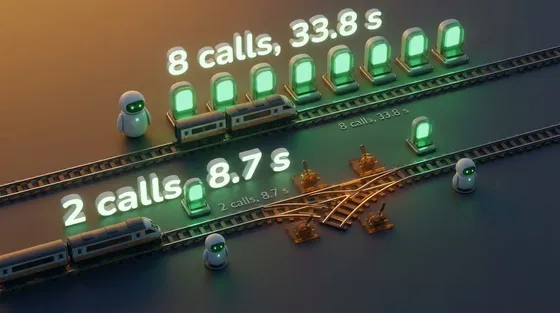
The same dinner booking, sent to Claude as a free-form tool loop and as a state machine. Per-state tool lists sent 61% fewer tokens, but with prompt caching on they cost 23% more on input, and with output counted the two came out about even. The real saving was code running the steps that need no model, 8 calls down to 2 and about 72% off the total, plus a table of every state against every event.
AI & agentic architecturesai-agentsprompt-engineeringarchitecture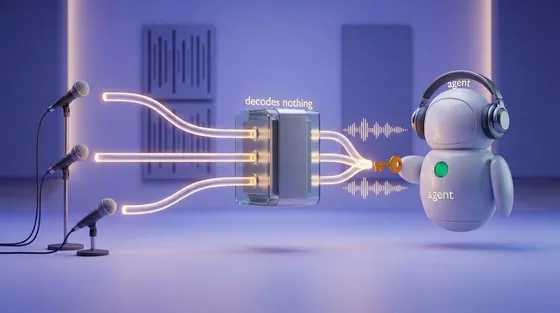
SFU, MCU, and the participant that has to decode
Put an AI agent in a group call and two questions decide the design: does the model hear each person, or one blend, and who has to hold the keys? Both come down to where the agent's audio gets decoded.
AI & agentic architecturesai-agentswebrtcarchitecture
Diagrams worth reading
My agent could already write Mermaid. Diagrams worth reading took a skill that chooses the picture, keeps the facts intact, and checks the drawing before handing it back.
AI & agentic architecturesai-agentsarchitecture
 AI
What a state machine buys an agent
The same dinner booking, sent to Claude as a free-form tool loop and as a state machine. Per-state tool lists sent 61% fewer tokens, but with prompt caching on they cost 23% more on input, and with output counted the two came out about even. The real saving was code running the steps that need no model, 8 calls down to 2 and about 72% off the total, plus a table of every state against every event.
ai-agentsprompt-engineeringOct 2026 AI
SFU, MCU, and the participant that has to decode
Put an AI agent in a group call and two questions decide the design: does the model hear each person, or one blend, and who has to hold the keys? Both come down to where the agent's audio gets decoded.
ai-agentswebrtcOct 2026 AI
Diagrams worth reading
My agent could already write Mermaid. Diagrams worth reading took a skill that chooses the picture, keeps the facts intact, and checks the drawing before handing it back.
ai-agentsarchitectureSep 2026
Comments