How two computers find a path
NAT, STUN, TURN and ICE, and how ICE checks every path and picks one.
On this page · 9 sections
- Why your laptop doesn’t know its own address
- Asking a stranger how you look: one STUN round trip
- The XOR trick, done correctly
- When the answer depends on who’s asking
- TURN: a relay that gets through, at a price
- ICE: gather, exchange, check, pick
- Who gets checked first
- Proving the check came from the right call
- Watch your own browser do it
- The demo
Back to Alice, 9:17 AM in Paris, asking her assistant about the weather. The first post followed one packet of her voice from her laptop to the server, and the second dealt with what happens when packets arrive late or not at all. Both quietly assumed something: that her laptop and the assistant’s server already knew how to reach each other.
They didn’t. We’ll see why her laptop doesn’t even know its own address on the internet, how it asks a stranger to find out, what happens on networks where that isn’t enough, and how ICE, the part of WebRTC that sets up the path, tries every way the two sides might reach each other and settles on one. All of it happens before the first 20 ms of sound is sent.
The short version
- Alice’s laptop has a private address. Her router rewrites it on the way out, so only something outside can tell her what the internet sees.
- STUN is that something: one round trip to a server that answers “you look like 192.0.2.10:54321 to me”.
- When no direct path exists at all, a TURN relay carries the traffic for her, at a real cost.
- ICE gathers every address each side might be reached at, checks the pairs in a strict priority order, and keeps one that answers.
- Every check is signed with a password from the call’s own setup, so nobody who didn’t see the call’s setup can steer the path.
Terms we’ll lean on, each explained where it first matters:
| Term | In one line |
|---|---|
| NAT | Network address translation: a router rewrites private source addresses to its one public address, and back |
| STUN | A small request/response protocol; its Binding request asks a server “what address did this come from?” |
| TURN | A relay server that forwards packets for a client that can’t get a direct path |
| ICE | Interactive Connectivity Establishment: gather candidate addresses, check them in pairs, pick one |
| Candidate | One address and port where a side might be reachable: host, server-reflexive, peer-reflexive or relayed |
| SDP | The text two sides exchange at call setup: codecs, the candidates, and a fingerprint for the encryption that follows |
Why your laptop doesn’t know its own address
Ask Alice’s laptop for its address and it says 192.168.1.42. That’s a private address (RFC 1918): her phone has 192.168.1.43, her TV .44, and so does some phone in a flat in Lisbon, because every home network reuses the same ranges. They only mean something inside the home.
The address the internet sees belongs to her router. When the laptop sends a packet out, the router rewrites the source to its own public address, remembers the mapping, and reverses it for the reply. That’s NAT.
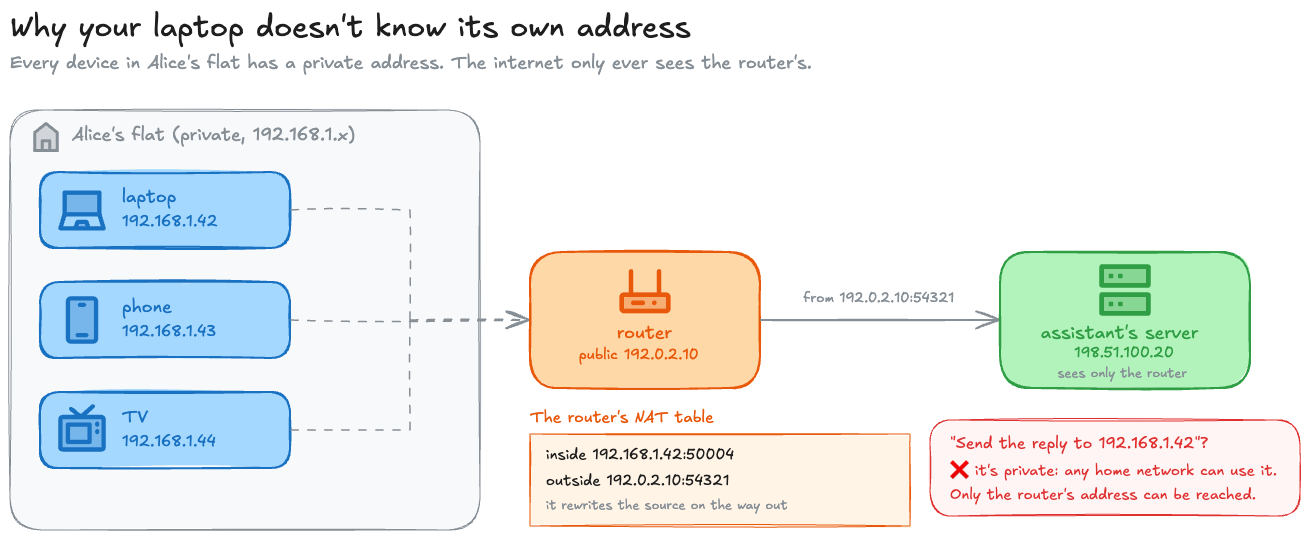
So the laptop knows an address nobody outside can use, and the address everybody outside sees is one the laptop was never told. To give the assistant’s server something it can send to, Alice first has to find out what she looks like from outside.
Asking a stranger how you look: one STUN round trip
The trick is simple: send a packet to a server on the public internet and ask it what source address the packet arrived with. That’s STUN’s Binding request.
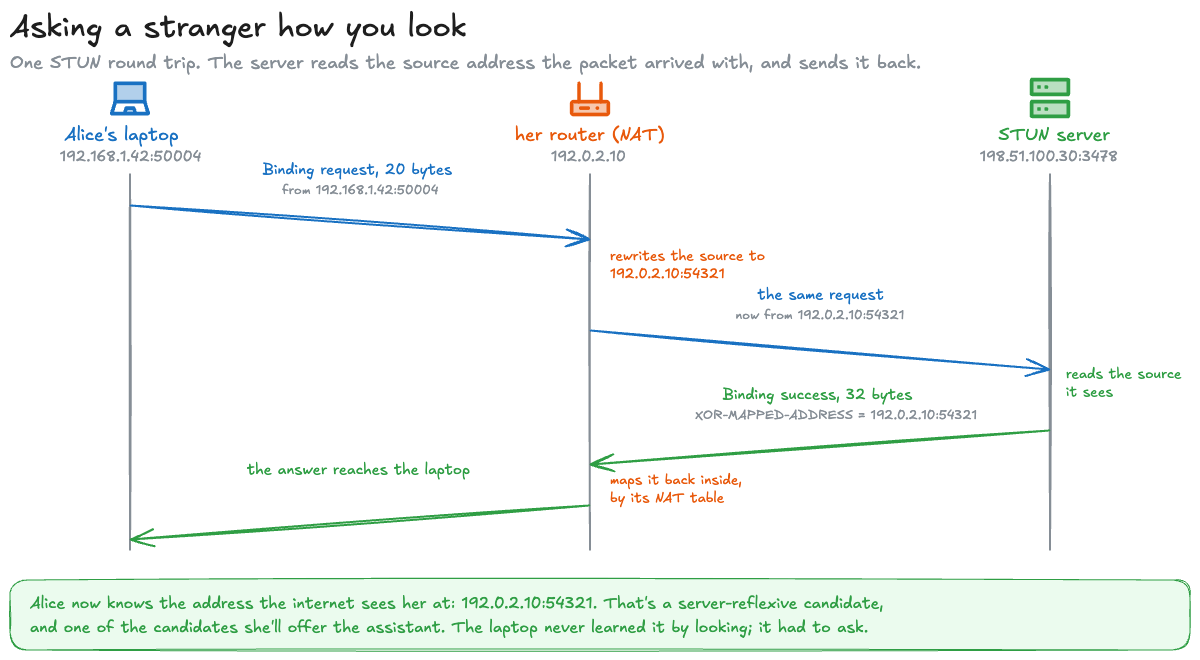
Here are both messages as the demo builds them. A STUN message is a 20-byte header followed by attributes (RFC 8489 §5):
00 01 00 00 21 12 a4 42 b7 e7 a7 01 bc 5c a4 93 5d 33 93 47The whole question. Type 0x0001 (Binding request), no attributes, the magic cookie 0x2112A442, and 12 random bytes of transaction ID so the answer can be matched to it.01 01 00 0c 21 12 a4 42 b7 e7 a7 01 bc 5c a4 93 5d 33 93 47Binding success. Type 0x0101, 12 bytes of attributes follow, the same cookie and the same transaction ID.00 20 00 08 00 01 f5 23 e1 12 a6 48The answer. Attribute type 0x0020, length 8, family IPv4, then the port and address, XORed. Undone, they're 192.0.2.10:54321.STUN is small enough to write by hand, and the demo does, in the standard library only. A request is nothing but that header:
MAGIC = 0x2112A442BINDING_REQUEST = 0x0001
def header(kind: int, length: int, txid: bytes) -> bytes: return struct.pack("!HHI", kind, length, MAGIC) + txid
def binding_request(txid: bytes) -> bytes: return header(BINDING_REQUEST, 0, txid)!HHI is two 16-bit fields and one 32-bit field in network byte order: the type, the length of what follows (zero, for a question with no attributes), and the cookie. The 12 transaction ID bytes go on the end.
The server is the part that surprises people, because there’s almost nothing to it. It doesn’t look inside the packet for an address. It reads the one the operating system hands it with every datagram, and sends that back:
def serve(sock: socket.socket) -> None: while True: data, addr = sock.recvfrom(2048) msg = parse(data) if msg["type"] == BINDING_REQUEST: sock.sendto(binding_success(msg["txid"], addr[0], addr[1]), addr)recvfrom returns the datagram and addr, the source IP and port it arrived from. That’s the whole trick: after Alice’s router has rewritten the packet, addr is 192.0.2.10:54321, and nobody had to know it in advance. On the client side, ask() checks that the answer carries its own transaction ID before believing it, since any UDP packet could arrive on that socket.
Run it and you get the same bytes as above, then one real round trip on your machine:
$ python3 stun.py Binding request (20 B) 00 01 00 00 21 12 a4 42 b7 e7 a7 01 bc 5c a4 93 5d 33 93 47 Binding success (32 B) 01 01 00 0c 21 12 a4 42 b7 e7 a7 01 bc 5c a4 93 5d 33 93 47 00 20 00 08 00 01 f5 23 e1 12 a6 48 ...A real round trip to a local STUN server at 127.0.0.1:57958: it saw the request come from 127.0.0.1:64299. No NAT on loopback, so that is the client's own socket.On loopback there’s no router in the way, so the server just sees the client’s own socket. Point it at a public server with --public and you’ll see your router’s address instead.
The magic cookie has a second job besides marking the message as STUN: it’s also the key for that XOR.
The XOR trick, done correctly
Why XOR the address at all? Because some NATs try to be helpful. RFC 8489 puts it bluntly: some NATs “rewrite the 32-bit binary payloads containing the NAT’s public IP address, such as STUN’s MAPPED-ADDRESS attribute, in the well-meaning but misguided attempt to provide a generic Application Layer Gateway (ALG) function” (§14.2). A router that spotted its own address in the answer could rewrite it. XORed with the cookie, its address isn’t there to spot.
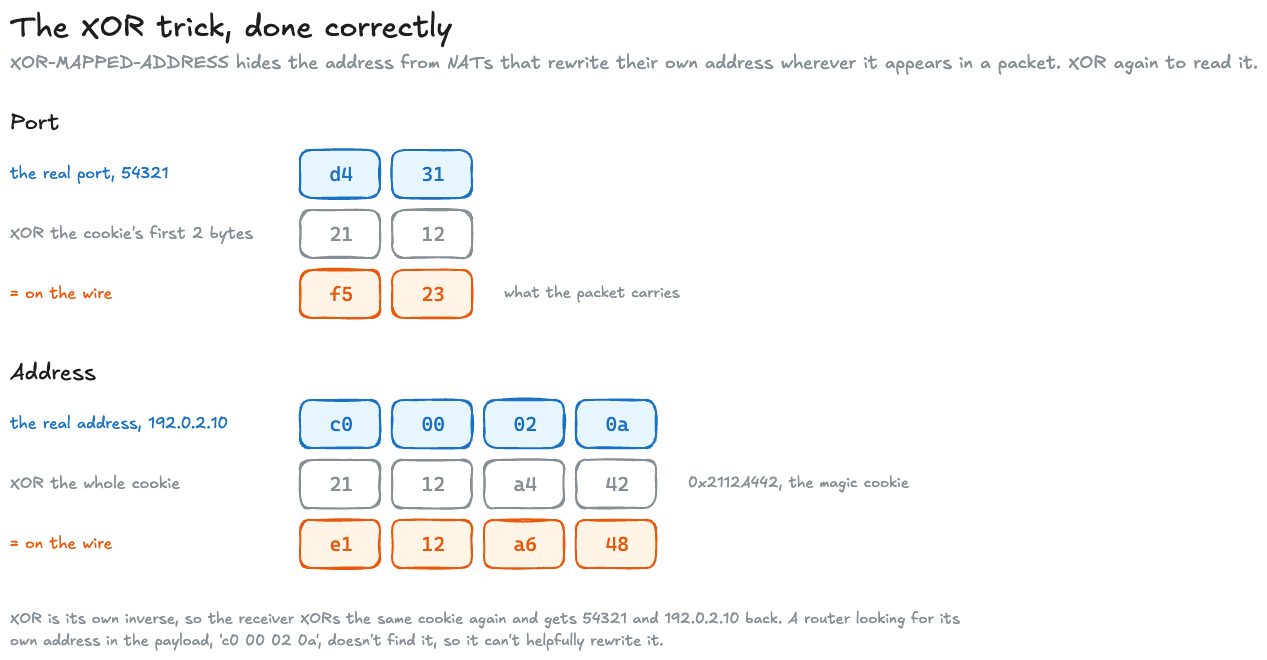
In the demo, building the attribute is three lines, and reading it back undoes the same two XORs:
def xor_mapped_address(ip: str, port: int) -> bytes: """XOR-MAPPED-ADDRESS for IPv4 (RFC 8489 section 14.2): port XOR the cookie's top 16 bits, address XOR the cookie.""" x_port = port ^ (MAGIC >> 16) x_addr = int(ipaddress.IPv4Address(ip)) ^ MAGIC return struct.pack("!HHBBHI", XOR_MAPPED_ADDRESS, 8, 0, 0x01, x_port, x_addr)
# in parse(), for the same attribute on the way back_, family, x_port, x_addr = struct.unpack("!BBHI", value)ip, port = str(ipaddress.IPv4Address(x_addr ^ MAGIC)), x_port ^ (MAGIC >> 16)The format string is the attribute’s layout read left to right: type and length (16 bits each), a zero byte, the family (0x01 for IPv4), the 16-bit port and the 32-bit address.
A common wrong versionIt’s easy to XOR the port with the whole cookie, or the address with only half of it, and an example that does decodes to an address that isn’t the one it names. That’s why I print the arithmetic here and checks the bytes with a second implementation: the demo’s CI parses them again with aioice, an independent Python implementation of ICE.
Paste any STUN message into the decoder below, as hex or as a hex dump copied from Wireshark, and it does the same unpicking. The samples include an ICE connectivity check built with aioice, with the attributes ICE adds, and the 401 reply a TURN server sends to a first request without credentials, its “authenticate first” answer.
What STUN doesn’t doOlder articles say STUN tells you what “type” of NAT you’re behind, and from that whether a call will work. The first version of STUN did try to sort routers into a few types. It turned out real routers didn’t fit them, and the next version dropped the idea: the classification “was found to be faulty, as many NATs did not fit cleanly into the types defined there” (RFC 5389 §1). So today STUN does one small job, telling you the address it saw. Deciding which address a call should actually use is ICE’s job, later in this post.
When the answer depends on who’s asking
STUN’s answer is only useful as an address to hand out if the router keeps using that same mapping when Alice sends to anyone else. RFC 4787 asks every NAT to: “A NAT MUST have an ‘Endpoint-Independent Mapping’ behavior” (REQ-1). Not all of them comply.
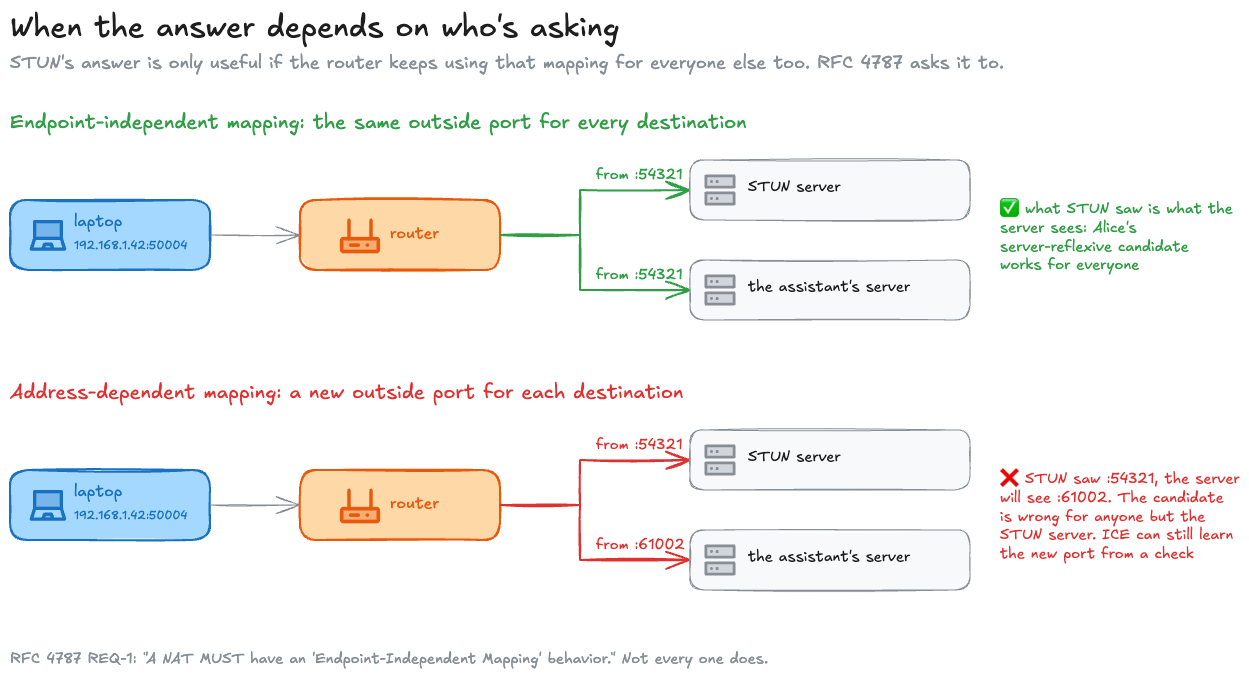
For Alice’s call that’s survivable. The assistant’s server is on the public internet and answers whatever address a check arrives from, so her packets still get through, just from a port nobody predicted; we’ll see how ICE picks that up below. The trouble starts when the other side is behind a NAT too, one that only lets in packets from addresses it has itself sent to. Then neither side can predict where to send, and RFC 4787 is plain about it: with ICE, “connectivity will require a UDP relay” (§5). The same goes for any network that won’t let UDP through at all.
TURN: a relay that gets through, at a price
A TURN server (RFC 8656) gives Alice an address on the server itself, a relayed transport address, and forwards everything between that address and her. The assistant’s server sends to the relay; the relay passes it on.
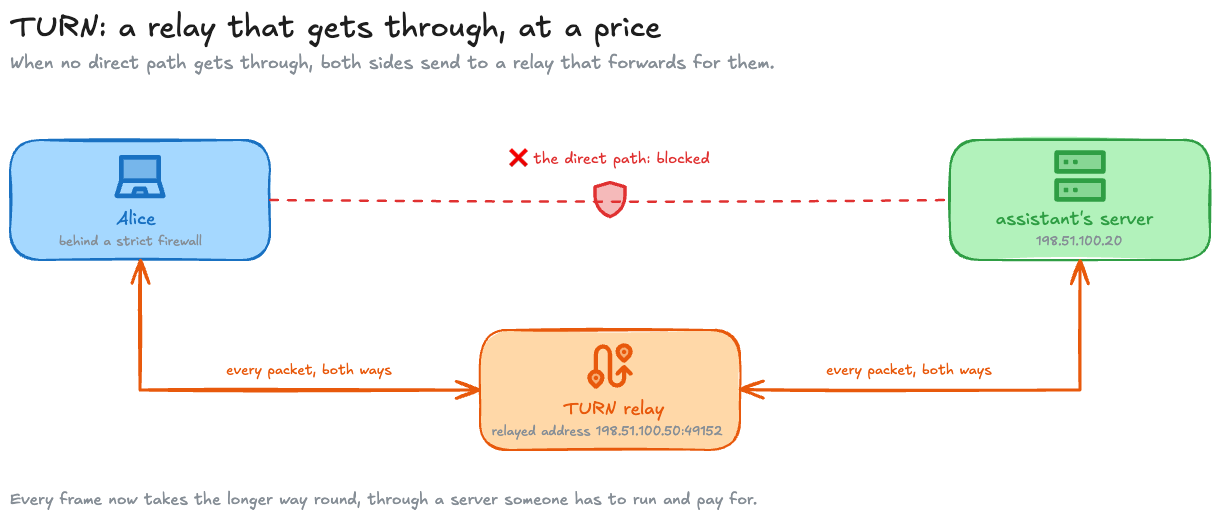
What a relay costs, in plain terms (RFC 8656):
| Cost | What it means |
|---|---|
| Setup | Alice has to log in to the relay and ask for an address, an allocation. It lasts 10 minutes by default and her browser keeps renewing it while the call lasts |
| Permission | The relay only forwards packets from addresses Alice has said she expects, so a stranger can’t send her traffic through it. Each permission lasts 5 minutes unless renewed |
| Bytes | Every packet gets wrapped for the relay: 36 extra bytes, or just 4 once Alice and the relay agree on a short channel number |
| Money | All the audio flows through someone’s server. The RFC itself calls that “a high cost to the provider of the TURN server”, and says a relay should be used “only when a direct communication path cannot be found” |
My recommendationIf your users are on networks you don’t control, run TURN from the first day, and treat it as insurance rather than as the normal path. The calls that need it have no other way to connect, and they’re the ones a user remembers as “it just didn’t work”. Offer it over TCP and TLS as well as UDP, which RFC 8656 allows, because the networks that block UDP are exactly the ones that need a relay. And measure how many of your calls end up relayed, since that number is what your relay bill depends on, and it depends on your users more than on anything you can read.
ICE: gather, exchange, check, pick
Now Alice has three ways she might be reached, and ICE calls each one a candidate: her laptop’s own address (a host candidate), the address STUN reported (server-reflexive, or srflx), and an address on a TURN relay (relayed). She can’t know in advance which ones the other side can reach, so she offers all three, and ICE (RFC 8445) tries them and keeps one that works. It does it in four steps:
- Gather. Each side collects its candidates: its own addresses, a STUN answer, a TURN allocation.
- Exchange. The candidates travel inside the SDP offer and answer, the two messages a call’s signalling channel carries to set the call up.
- Check. Each side pairs its candidates with the other side’s and sends a small STUN message down each pair, best pair first, to see which ones get an answer.
- Pick. One side, the controlling agent, chooses a pair that answered and tells the other. Normally that’s the side that sent the offer; here it’s Alice either way, because the other side can’t.
Gathering takes time, a STUN round trip and a TURN allocation each, and waiting for all of it before sending the offer would delay every call. So browsers use trickle ICE (RFC 8838): the offer goes out with whatever candidates are ready, the rest follow one at a time as they’re found, and checks start “while they are still gathering candidates”.
Who is on the other end matters too. In this series the other end is the server of Alice’s voice assistant, a made-up service that stands in for any real one, and the demo models it. A server like that usually runs ICE-lite, a cut-down ICE for machines that “will always be connected to the public Internet” (RFC 8445 §2.5): it has one public address, so it offers just that, never sends checks of its own, and simply answers Alice’s. Alice’s browser runs the full ICE, so it does the checking and the picking.
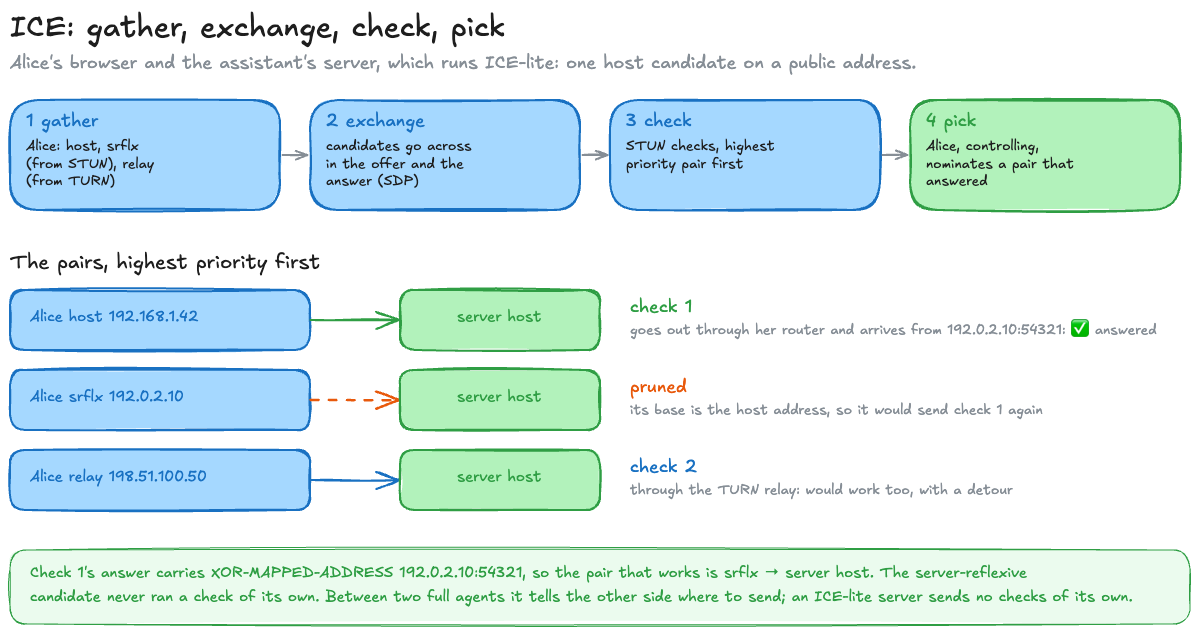
You’d expect three checks, one per candidate. There are two, and the reason is simple once you think about where packets can be sent from.
Alice’s browser has two places it can actually send a packet from: a socket on her laptop, and the address the TURN server lent her. Her server-reflexive address isn’t a third one. It’s what her laptop’s socket looks like from the outside, after the router has rewritten it. So “send a check from the srflx address” can only mean “send it from the laptop and let the router rewrite it”, which is exactly what the host check already does.
ICE spots that. When it forms the pairs it replaces a server-reflexive candidate with its base, the socket its packets really leave from, and drops any pair that would now send the same packet as a better one (§6.1.2.4). So the checks go like this:
- Check 1 leaves Alice’s laptop from 192.168.1.42:50004. Her router rewrites it to 192.0.2.10:54321 on the way out, as it does every packet.
- The server answers the address the check came from, 192.0.2.10:54321, and puts that address in its reply.
- Alice reads the reply and learns that this is the outside address that worked.
So the srflx pair was dropped from the list of checks to send, and still turns up on the list of pairs that work. Both are true because they’re different lists: one is what Alice sends, the other is what she learns from the answers. She sent one check, from her laptop, and the answer told her it had arrived from her srflx address.
If the router had used a fresh port for the server, as in the address-dependent case earlier, the reply would show an address Alice never offered. ICE calls that a peer-reflexive candidate, an address learned from the other side’s answer rather than from STUN, and uses it just the same.
In the demo, the replacement is one line when the pairs are formed, and the pruning is a set of what’s already been checked:
# 6.1.2.4: a reflexive local candidate is replaced by its base, the address the packets actually leave from.base = ALICE[0] if kind == "srflx" else (kind, ip, port)
# later, walking the pairs from highest priority downkept, seen = [], set()for x in pairs: key = (x["base"], x["remote"]) if key in seen: print(f"Pruned: {x['name']}. ...") # same socket, same destination: already on the list continue seen.add(key) kept.append(x)The key is the point: two pairs are the same check if they’d leave from the same socket for the same remote address, whatever the local candidate was called. Alice’s srflx pair has the same key as her host pair, and the host pair comes first, so the srflx one is dropped.
It runs this for Alice’s call and checks every number against aioice:
Pairs formed, highest priority first:  Alice host -> server host     9151314442783293438   sent from 192.168.1.42:50004  Alice srflx -> server host    7277816997797167102   sent from 192.168.1.42:50004  Alice relay -> server host      72057594004373502   sent from 198.51.100.50:49152
Pruned: Alice srflx -> server host. Its base is Alice's host address, so it would send exactly the check above it.
The checks, in the order they run:  1. from 192.168.1.42:50004 to 198.51.100.20:50004   (Alice host -> server host)  2. from 198.51.100.50:49152 to 198.51.100.20:50004   (Alice relay -> server host)
Once some pairs have answered, the controlling side picks one and marks its choice with a USE-CANDIDATE flag on a check. Which one it picks is left to each implementation, “a matter of local optimization” in RFC 8445’s words (§8.1.1). What both sides must agree on is the order the checks run in, and that comes from a priority.
Who gets checked first
ICE doesn’t try pairs in a random order. It ranks them so the likely best go first, and the ranking follows one idea: a direct path beats a relayed one, because a relay adds a detour and costs someone money. Each candidate gets a score from its type, highest for the laptop’s own address and lowest for a relay:
| Candidate type | Score it starts from | Why |
|---|---|---|
| host | 126 | The machine’s own address: no router or relay in the way |
| peer-reflexive | 110 | Learned from a check that already got through |
| server-reflexive | 100 | Through the router, but still direct |
| relayed | 0 | Through a TURN server: last resort |
A pair’s score is mostly the lower of its two candidates’ scores, so a pair is only as good as its weaker end. For Alice’s call that gives the order you’d guess: host to the server first, relay to the server last, and the srflx pair, which would have come second, dropped as a duplicate. And because both sides work the scores out the same way, from numbers they’ve both seen in the SDP, they agree on the order without having to discuss it.
The exact arithmetic, for the curious
The full priority packs three numbers into 32 bits (§5.1.2.1): the type score above, a local preference that ranks a machine’s network interfaces if it has several (65535 if it has one), and 256 minus the component, which is always 1 in WebRTC because RTP and RTCP share a port.
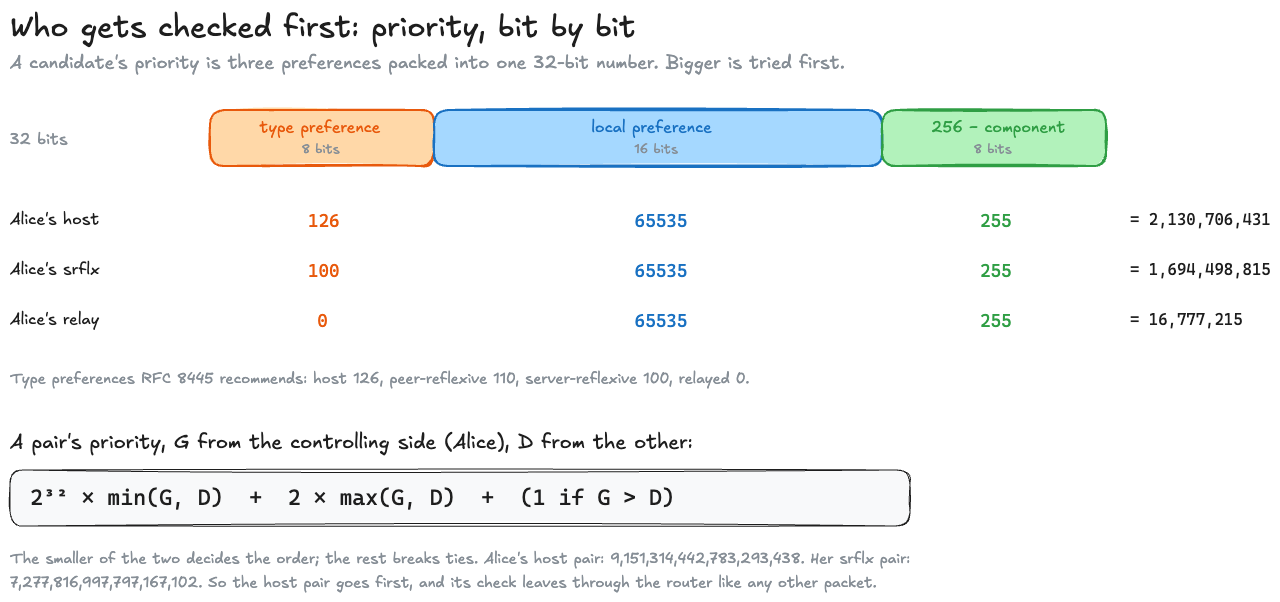
A pair’s priority then puts the lower candidate priority in the top 32 bits of a 64-bit number, so it decides the order, and uses the higher one and the controlling side only to break ties (§6.1.2.3). Both formulas are one line each in the demo, which checks every number against aioice:
TYPE_PREF = {"host": 126, "prflx": 110, "srflx": 100, "relay": 0}
def priority(kind: str, local_pref: int = 65535, component: int = 1) -> int: return (1 << 24) * TYPE_PREF[kind] + (1 << 8) * local_pref + (256 - component)
def pair_priority(g: int, d: int) -> int: return (1 << 32) * min(g, d) + 2 * max(g, d) + (1 if g > d else 0)1 << 24 is 2^24, so the type lands in the top 8 bits, exactly the boxes in the figure. Python’s integers don’t overflow, so the 64-bit pair priority comes out exact; JavaScript’s numbers can’t hold it, which is why the lab below works it out separately.
To try it, you need candidates: the a=candidate: lines from an SDP, like the three Alice offers, or a whole SDP, or what getStats() reports in a browser. The pair ranker takes both sides’ candidates and shows every pair, which ones are dropped as duplicates, and the order the checks run in. Start with the sample “Alice and an ICE-lite server”, which is Alice’s call; then try “Two browsers”, where both sides have three candidates and there are nine pairs.
Proving the check came from the right call
A connectivity check is a STUN message to an address someone put in an SDP, so what stops a stranger from answering, or from sending checks that steer the call somewhere else? Each side puts a short username fragment (ufrag) and a password in its SDP, and every check uses them.
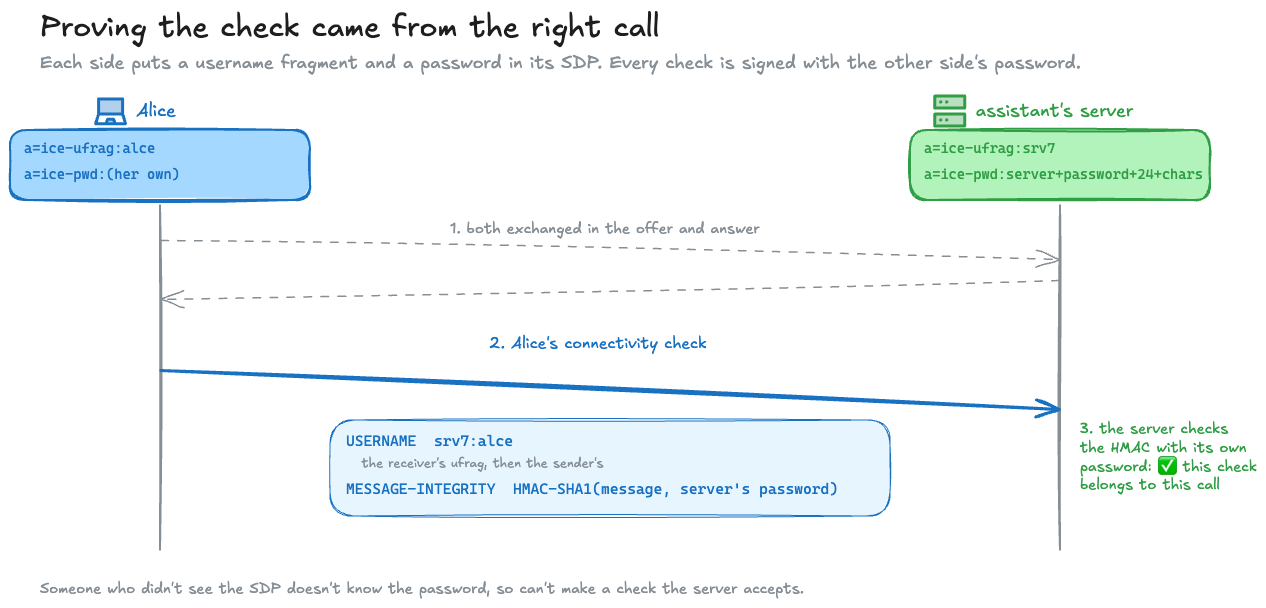
RFC 8445 spells it out: “A connectivity check from L to R utilizes the username RFRAG:LFRAG and a password of RPASS” (§7.2.2). Someone who didn’t see the SDP doesn’t know the password, so can’t produce a check the other side will accept.
Watch your own browser do it
The lab below runs ICE between two connections in this tab, so nothing is sent to any server. You’ll see each side’s candidates as your browser gathered them, then your browser’s own candidate pairs from getStats(): their state, their priority and round trip, and which one it selected. The second button is the STUN round trip we started with, against a real server. Outside the lab, Chrome shows all of this for any call on its chrome://webrtc-internals page.
This lab runs a real call in your browser, so it needs JavaScript.
Things to notice:
| Look at | What it shows |
|---|---|
| The host candidates’ addresses | Long names ending in .local, not IP addresses. Chrome has hidden local addresses behind mDNS names (multicast DNS, resolvable only on the local network) since Chrome 76, in 2019, for pages without microphone or camera permission (the announcement) |
| The priorities | Type 126, so host. If there are several host candidates, their priorities differ a little: the browser ranks its own network interfaces, Wi-Fi above a VPN, say, in the middle bits of the number. Paste the candidate lines into the pair ranker to see the order RFC 8445 gives them, and compare it with the browser’s own list |
| The pair priorities | Worked out exactly from the two candidates. getStats() reports them as JavaScript numbers, which can’t hold all 64 bits, so the browser’s own figure loses the last digits: the lab shows it beside the exact one |
| The STUN answer | Your public address and port, as Google’s server saw them, and how long the answer took, the browser’s own setup included |
One thing the lab does differently from a real call: it waits for each side to finish gathering before it hands the candidates over, so that the tables are complete. A real browser trickles them, as described above, and starts checking sooner.
The demo
The code examples all come from two small Python scripts in find-a-path/. They’re there so you can check the post’s numbers yourself, and change them.
| Script | What it does | What to look for when you run it |
|---|---|---|
stun.py | Builds the Binding request and answer above, byte by byte, prints the XOR arithmetic, then runs a real STUN server on your machine and asks it one question | The same bytes as the byte view above, and a server that sees your own socket, because there’s no router on loopback. With --public, it asks Google’s server instead and prints your public address |
ice_priority.py | Works out every priority for Alice’s call, forms the pairs, drops the duplicate, and prints the checks in order. Every number is checked against aioice, an independent ICE library, and the script stops if they ever disagree | The two checks, and the “Pruned” line saying why the srflx pair isn’t one of them. Change Alice’s candidates at the top of the file and watch the order change |
cd mainlog-code/find-a-pathpython3 stun.py # no install needed: the bytes, then a local STUN serverpython3 stun.py --public stun.l.google.com:19302 # how a real server on the internet sees youpython3 -m venv .venv && .venv/bin/pip install -r requirements.txt.venv/bin/python ice_priority.py # needs aioice, for the cross-checkIts CI runs both on every change and fails if the bytes, the XOR or the priorities ever stop matching the numbers above, or if aioice reads the bytes differently.
So before the first packet of Alice’s voice can go anywhere, her browser has learned an address it couldn’t see, offered every way it might be reached, and checked them in an order both sides agree on. Next, the path is found but anyone on it can read the packets. The next post is the keys: DTLS, SRTP, and one call from cold start.
Related posts
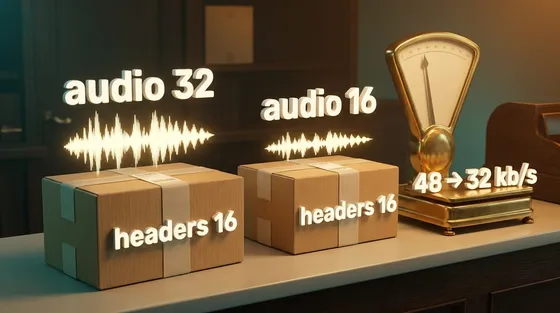
Half the bitrate, two thirds the traffic
Halving an audio bitrate from 32 to 16 kb/s took traffic from 48 to 32, because every packet's headers stay the same size. Packet rate is the other control.
Down to the wireaudionetworkingperformance
SFU, MCU, and the participant that has to decode
Put an AI agent in a group call and two questions decide the design: does the model hear each person, or one blend, and who has to hold the keys? Both come down to where the agent's audio gets decoded.
AI & agentic architecturesai-agentswebrtcarchitecture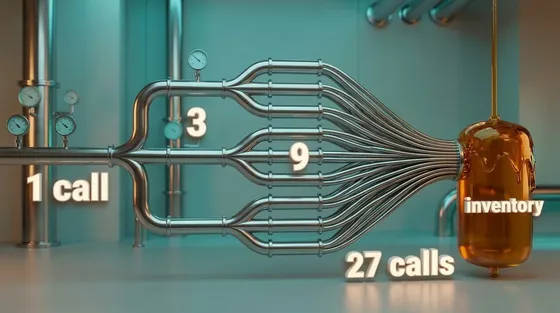
What a service mesh costs
Your shop now runs 14 services in three languages, and security wants every call between them encrypted and identified. A mesh does that without touching the code, for about a fifth of a millisecond per hop and a tenth of a core per proxy per 1,000 requests a second, measured here with real Envoy. It also brings retry and queue defaults nobody chose. Over plain HTTP they retry less than most people expect; over gRPC, or after one common edit, a failing service gets 27 calls for one checkout.
Down to the wireinfrastructuremicroservicesnetworking
 Networking & media
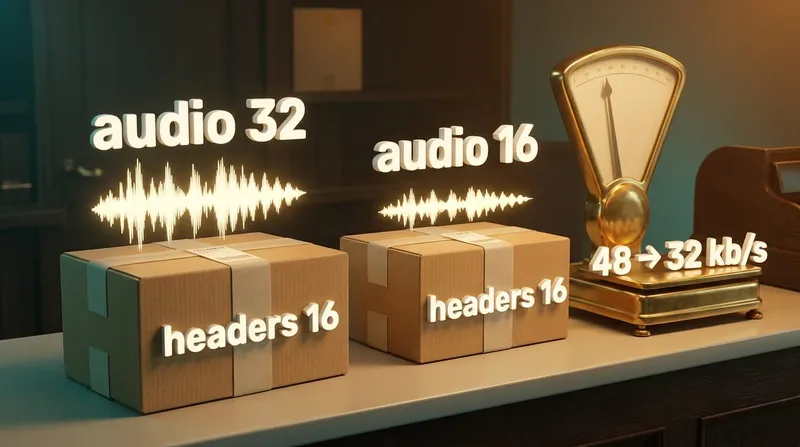
Half the bitrate, two thirds the traffic
Halving an audio bitrate from 32 to 16 kb/s took traffic from 48 to 32, because every packet's headers stay the same size. Packet rate is the other control.
audionetworkingAug 2026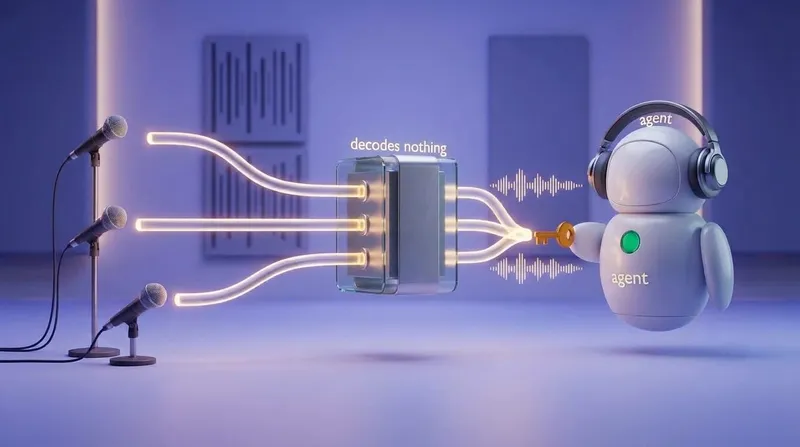 AI
SFU, MCU, and the participant that has to decode
Put an AI agent in a group call and two questions decide the design: does the model hear each person, or one blend, and who has to hold the keys? Both come down to where the agent's audio gets decoded.
ai-agentswebrtcOct 2026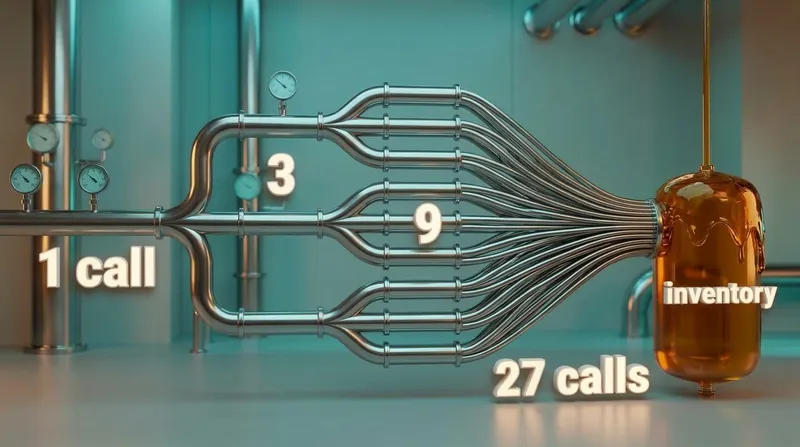 Systems
What a service mesh costs
Your shop now runs 14 services in three languages, and security wants every call between them encrypted and identified. A mesh does that without touching the code, for about a fifth of a millisecond per hop and a tenth of a core per proxy per 1,000 requests a second, measured here with real Envoy. It also brings retry and queue defaults nobody chose. Over plain HTTP they retry less than most people expect; over gRPC, or after one common edit, a failing service gets 27 calls for one checkout.
infrastructuremicroservicesOct 2026
Comments